Nueva publicación
Avatar
0

Dear COmmuniy,

New to Finale.

I have some XMLs here. After having importing these into Finale, how can I convert the whole newly created document into Finales typical Jazz Layout (Text, chords notes etc) Maybe there are some default templates to bring in with some clicks


THX very much

Cheers

Tim.

3 comentarios

Fecha Votos
Avatar
0

Have you tried copying (Select All) from the xml document you opened (in Finale) and then posting it into a similarly configured new empty document set up from the Jazz Document Style?

Acciones de comentarios Permalink
Avatar
0

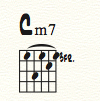
I tried a bit with the templates in my trial version. I have some difficulties with the chord types after copying the material into the jazz document.

How to setup a proper jazz document in advance?


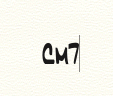
If I write "Cm7" :

it results in:


Acciones de comentarios Permalink
Avatar
1

… I have some XMLs here. After having importing these into Finale, …


This is a misunderstanding.

You can not import anything into Finale.

You can only import into a Finale document.

When importing a MusicXML file, Finale opens a Default Document, and imports the XML into that Default Document.


To import a MusicXML into a Jazz font layout, first go to

Preferences - New

and specify the Default Document.

(If no Default Document is specified, Finale will use the document Maestro Font Default.)

Since you need Jazz font, type the following document name into the field Default Document:

Jazz Font Default.musx

Click OK to exit the Preferences.


Now, you can import the MusicXML file:

File menu > Import > MusicXML…

Acciones de comentarios Permalink

Iniciar sesión para dejar un comentario.