Nueva publicación
Avatar
0

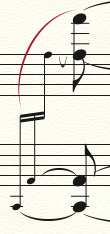
The original entry had cramped grace notes:
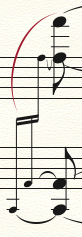
So I manually respaced them:

However, if I enter speedy entry again to take care of other business, the grace notes snap back to their original position. Is it possible to keep manually respaced notes locked in their new position?

5 comentarios

Fecha Votos
Avatar
0

1. In Document Options > Music Spacing, set Manual Positioning to Incorporate.

2. Save your adjustments until all the notes are in.

Acciones de comentarios Permalink
Avatar
0

I followed #1 and it's still happening. Should I save, quit and reopen in order to take hold? I apologize as I'm not understanding #2. All notes have been notated, I'm doing a final fine tuning. Thanks,

Acciones de comentarios Permalink
Avatar
0

I suspect you have Automatic Music Spacing turned on, in the Preferences. Once the notes are in, turn it off. Then, you can make your spacing edits without the problems.

Acciones de comentarios Permalink
Avatar
0

Assuming nothing's changed since v25.5 in this area ...


Document Options > Music Spacing > Grace Note Spacing > Keep Current

Acciones de comentarios Permalink
Avatar
0

Bingo Mike, worked like a charm. Thanks,

Acciones de comentarios Permalink

Iniciar sesión para dejar un comentario.