Nueva publicación
Avatar
0

Finale 26, Windows 10

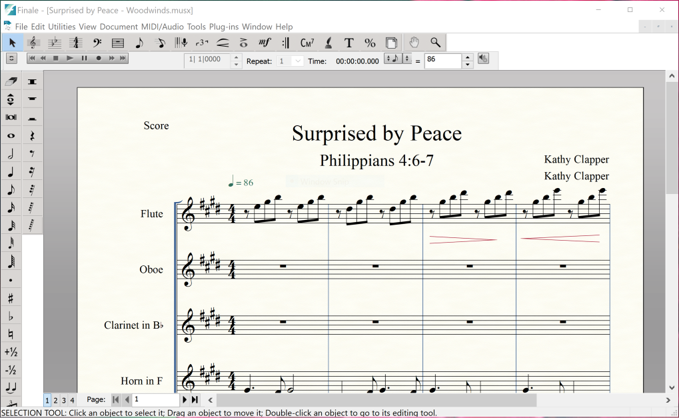
Last year I purchased a new laptop, a Dell XPS 13 (Windows 10), for travel and installed Finale 26. I didn't pay much attention to Finale until last month when I was on the road and needed to edit music. The playback icons on the ribbon are smaller than the other icons. And, in fact, they won't start or stop playback. The other icons do work. To get playback I have to use MIDI/Audio/Start Playback and Stop Playback. But using them is a hassle on a small screen. I uninstalled and reinstalled Finale today. The icons are still very small and do not work. Any suggestions?

Thanks, Kathy

(I see there is no place to upload a screen shot of the icons.)

5 comentarios

Fecha Votos
Avatar
0

You should see 7 icons across this screen. Click on the second icon from the right to upload a screen shot in jpg or png.

Acciones de comentarios Permalink
Avatar
0

Acciones de comentarios Permalink
Avatar
0

I guess no one has an answer. I uninstalled Finale again. Then checked for Windows updates and installed those. And installed Dell updates. Then restarted my Dell XPS 13 and reinstalled Finale. Same small icons on the ribbon as in the JPEG above. Unchecking and rechecking Playback Controls under Window does not change their size. However, this time clicking on the record button starts playback! I'm now a happy, but not completely satisfied, camper.

Acciones de comentarios Permalink
Avatar
0

I don't know that the buttons can be resized—never been an issue for me. Have you contacted Make Music directly?


This is a Users forum. To contact MM directly, use the Submit a request link at the top of the page.


Acciones de comentarios Permalink
Avatar
0

Thanks Mike. Will do.

Acciones de comentarios Permalink

Iniciar sesión para dejar un comentario.