Nueva publicación
Avatar
0

During notation in 12/8 time Finale automatically fills rests like this:

However, I would like to change this in dotted quarters (and half measure rests):
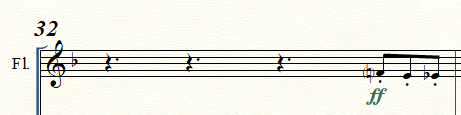
without having to do this manually in every measure. Is there a general setting to do this? I don't seem to find it.

Thanks for your replies! 


Finale26 | Win10

3 comentarios

Fecha Votos
Avatar
0

MIDI/Audio menu > Quantization Settings > More Settings…


Allow Dotted Rests


To update already existing rests with the new setting, from the Selection Tool select the rests, and use

MIDI/Audio menu > Retranscribe

Acciones de comentarios Permalink
Avatar
0

@Peter T.: Thanks, works like a charm! I'm a bit confused though why this notation item obviously has to be found in Midi/Audio settings?

Acciones de comentarios Permalink
Avatar
0

Probably because the folks most often using quantization are doing so in connection with MIDI/Hyperscribe entry of notes or MIDI import form a DAW.


I admit, I have sometimes struggled to find the option on the rare occasions when I want to use it.

Acciones de comentarios Permalink

Iniciar sesión para dejar un comentario.