Nueva publicación
Avatar
0

Windows 10 - Finale 25

When I extract parts from a conductor (is this the right word ?), all parts are in Letter format, even is the conductor is in A4 format. I need to change the page size on every part, and change the mage margins, the system margins and so on. Is a way to extract parts in a pre-defined format choosen (choose of format, page margins,...) ? It could be very useful.

4 comentarios

Fecha Votos
Avatar
0

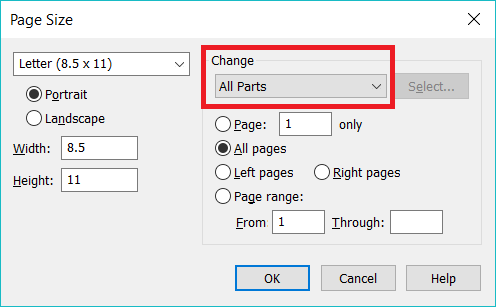
It seems to me that Page Tool > Page Layout > Page Size gives you the control you want if you use the pull-down menu. This will only affect subsequently created linked parts. (Few people actually extract parts unless there is a special need, but since extracted parts are based on Linked Parts, this panel should give you control.)


(You might find that Redefine Pages will let you apply these settings to your Linked (but not already extracted) parts retroactively.)

Acciones de comentarios Permalink
Avatar
0

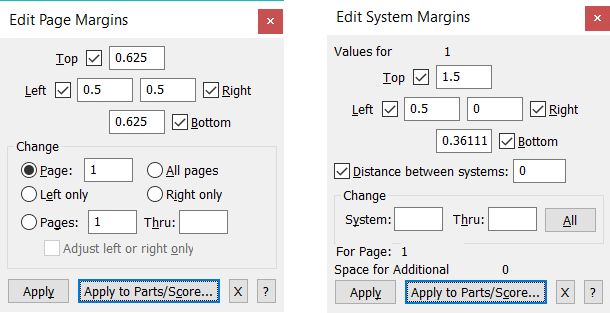
Ok for the Page Size (thnak you), but how to proceed if I want page margins (top 1,5 cm, sides 0,6 cm, bottom 0,5 cm - in example) or system margins ?

Acciones de comentarios Permalink
Avatar
0

The settings in


Document menu > Page Format > Score…

and

Document menu > Page Format > Parts…


define the settings for all new pages.


To update already existing pages, use the Page Layout menu command

Redefine Pages > …

Acciones de comentarios Permalink
Avatar
0

If you want to change the page margins, there is another Page Layout menu option for that, as there is for system margins. You can change the measurement units in the Edit Menu.


(It's all in the User Manual, and the interface is fairly logical. I'd like to think the documentation is available in French. Here is a link to check out.

https://makemusic.zendesk.com/hc/en-us/articles/216747617-Finale-notation-software-in-languages-other-than-English

Don't be afraid to experiment--on a copy of your file, if you are worried about not being able to recover.)

Acciones de comentarios Permalink

Iniciar sesión para dejar un comentario.