Nueva publicación
Avatar
0

Windows 10 desktop, Finale v.26.

I just purchased and downloaded version 26 onto my Windows 10 desktop and cannot enter notes from my computer keyboard as I have done for countless years (25 years, in fact!)  MIDI input is NOT checked - in fact, I deliberately unchecked it - so this is not the issue. Nothing gets entered, though I can delete notes from pre-existing files. Simple Entry  works but it's not helpful for the kinds of projects I do

I have not found a solution in the User Guide. The only thing I keep finding is about disabling MIDI input, which is the first step I always take with any Finale upgrade.

Thanks for any thoughts you may have.

5 comentarios

Fecha Votos
Avatar
0

How are you using Speedy Entry to enter your notes? Are you trying to use the number pad for rhythmic value and your QWERTY keyboard to enter pitch?


Since I use the numeric keypad for rhythmic values and my MIDI keyboard for pitch, I definitely do want the MIDI input box checked.

Acciones de comentarios Permalink
Avatar
0

Number pad for rhythmic values and clicking on the staff with my mouse cursor for pitches. That's the input method I've used for years. I don't use a MIDI keyboard for anything.

Acciones de comentarios Permalink
Avatar
0

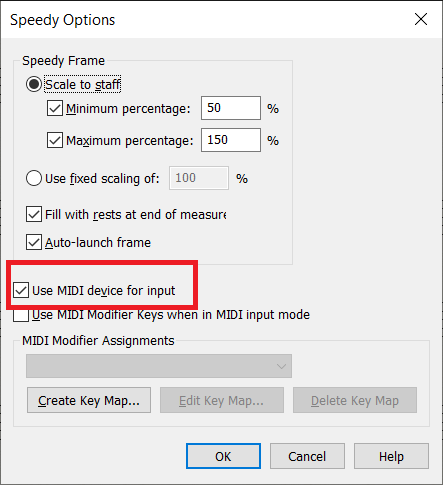
Did you realize (as I did not) that in addition to the "Use MIDI device for input" in the Speedy menu, there is another checkbox in the Speedy Options sub-menu? Seems kind of crazy (and confusing0 to me.


Acciones de comentarios Permalink
Avatar
0

Thank you both for your responses. I checked my settings, and I had already found the Speedy options and unchecked MIDI there as well. Finale doesn't appear to change that dramatically over time, so it seems I should still be able to move the cursor with my mouse in my right hand to the appropriate staff line and then just click the desired note value with the number pad with my left and get what I need, just as I always have. Like most systems, it's fast for me since I've been doing this for years.

Acciones de comentarios Permalink
Avatar
0

I cannot imagine what is causing this difficulty. I have not problems entering notes with the mouse (so long as MIDI input has been switched off).

I click on the desired line or space and then press a numeric-keypad key to add the note at the correct pitch.


Presumably since installing Finale 26 you have restarted the program and rebooted the computer. There is the far-off chance that reinstalling Finale would help, but that is an extreme route. Better first to see what MakeMusic Support says via the "Submit a request" link. If you have not tried that route, you should. If you have, presumably you have told them their last suggestion did not work.

Acciones de comentarios Permalink

Iniciar sesión para dejar un comentario.