New post
Avatar
0

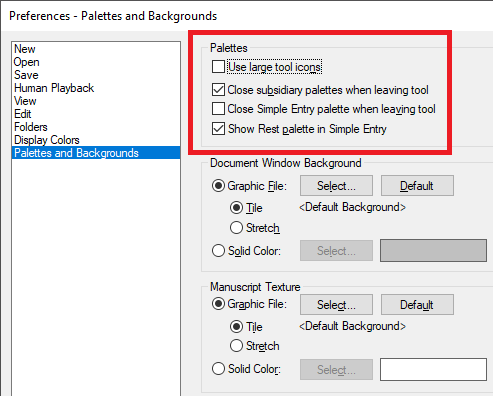
Win 10 - Just upgraded to 27, and downloaded the latest version (27.3.0.137).   I had this problem years ago, but now it's back: though the simple entry rests palette is NOT checked, it keeps popping up.  I close or uncheck it - and moments later, it's back.  How do I get rid of the damned thing for good??   Thanks for any help - 

6 comments

Date Votes
Avatar
0

Did you save the Preferences?

Comment actions Permalink
Avatar
0

Thanks very much for your response, Peter.   And yes, have my preferences saved.  Everything else is exactly as it should be whenever I re-open, but: that palette just starts popping up while I work; I close it and continue - and then again, it pops up...and I close it.  Sometimes (while checking status) after or before I simply close the palette, I check the Windows - and that palette might be checked, or unchecked.  JFWIW, I've been using Finale for well over 20 years.- and this one has me flummoxed.   Thanks again, Peter.  

Comment actions Permalink
Avatar
0

And now, here's a related complication.   I usually keep the smart shape palette checked and open as I work.  As I've been using Finale this morning, not only does the simple rests palette pop up unwanted - and it IS unchecked in the Window menu - but the smart shape palette now randomly disappears.  Even while using completely unrelated functions.   It IS checked under the Window menu - but I can't explain this strange behavior.   This has only been a problem since updating to 27.3.0.137.

And just for the record, Windows 10, version 1803 - OS build 17134.1246

Comment actions Permalink
Avatar
0

In other words, you have checked the appropriate boxes here.

Comment actions Permalink
Avatar
0

Les Marsden,


Since you have been using Finale for 20 years, I suppose that you have already tried removing the Preferences file (quit Finale first)?

When launched again, Finale will create a fresh, new Preferences file.

Comment actions Permalink
Avatar
0

Peter Thomsen - yes, of course.   Removing the preferences file/restoring with a new one was one of the first things I tried - twice.  And it provided NO fix.   Still had/have the same mis-behavior as before - 

And that's why I came here, and hoped for any knowledge of this bug and for any sort of resolution that's NOT a routine or usual fix.


Comment actions Permalink

Please sign in to leave a comment.