New post
Avatar
0

 MS Windows 10

Finale v25.2.0.9

When I create a piano part two staffs are created and joined together to the extent that the sliders in the mixer work as a pair. I would like to be able to adjust each (the treble and bass clefts) individually. The only way I've been able to do this so far is to create two piano parts and delete the bass staff from one and the treble staff from one in the Score Manager.

Please tell me there is a simpler way to go about this.

Thanks,

BobE

7 comments

Date Votes
Avatar
0

I would build a piano grand staff out of individual staves with separate MIDI channels to allow individual manipulation. In the Aria player you would put a piano in two different slots and address each staff (or even each layer) to a different slot/instance.

Comment actions Permalink
Avatar
0

I was really hoping someone would tell me how to create a piano part and split the two staves (or ungroup them) so they would work independently. What I'm doing is not real difficult to do but I do appreciate your thought process and think overall it's probably a good solution and may provide more flexibility. I just moved to Finale from Print Music and primarily just use it to copy purchased sheet music or other printed material to play as accompaniment while I try to learn violin. My motivation to go to Finale was the additional instruments included with the package. With that said you may understand that I'm not an accomplished transcriber, engraver or composer and most often just want to get to where I think I need to be quickly. So while some of this is over my head I do think you've opened another door for me. Now if I only knew more about Midi and their channels and playback through VST vs playback through MIDI.

Thanks, I appreciate the reply.

BobE

Comment actions Permalink
Avatar
0

Bob, 

Although JAVs instructions sound complicated, they really aren't. It shouldn't take more than a couple minutes to set up the score. Then, you can save it as a template, and you never have to do it, again. It will be there ready to go.

Comment actions Permalink
Avatar
0

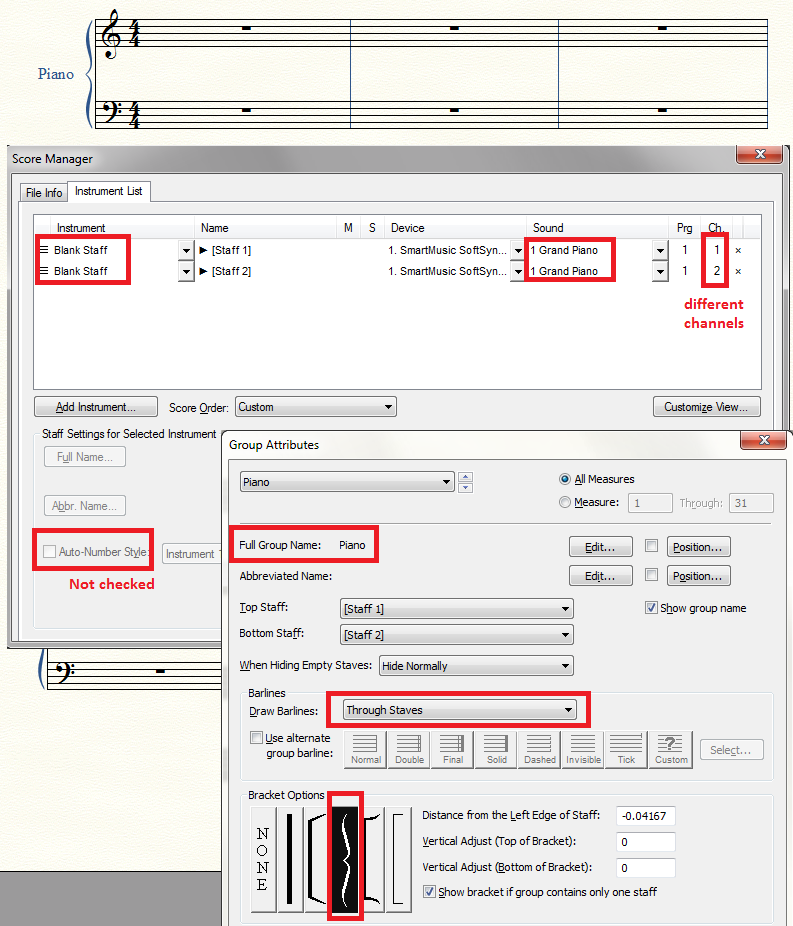
Here is a step-by-step of the basics.

  1. Open a new document and decide whether you want to play through MIDI or Play through VST (Aria) sounds.If you want to use MIDI sounds, you can just choose the default document. If you want Aria sounds, you can use the setup wizard and choose Engraved Style and a blank staff (Finale will probably use a piano sound for the blank staff--lucky us).
  2. Open Score Manager and Add an instrument: another blank staff. You will then notice that the bracket at the start of the system is a bracket rather than a curvy brace. If you are only interested in the sound, you can leave it as is. If you want the curly brace, or the system to be labeled as Piano, then you will understand why I (later) opened the Group Attributes (Staff Tool, right click on a handle of the bracket that is wrong).
  3. You should notice that Score Manager has automatically put the two staves on different MIDI channels (in the "Ch" column of Score Manager). If not, you can always click on the number in the Ch column and change it yourself.
  4. Turning off Auto-Number in the Score Manager is merely cosmetic, and in fact was not necessary when I used the Setup Wizard instead of the default doc. The same is true of all the things I called attention to in the Group Attributes: they are all cosmetic. Through Staves is probably automatic; the Group Name is optional. Even the brace (as mentioned above) is optional.

Once you have this file set up you can save it to use as a template or you can copy music from another file into the blank file.


Good luck. There is no substitute for experimentation. (Okay, a certain amount of reading instructions might be useful too, but likely not for solving this situation.)

Comment actions Permalink
Avatar
0

Thank you. I've done some experimenting with adding a violin part and I think I've got it. I do have one more question I'll ask. Why would one choose to use Playback thru MIDI as opposed to Playback through VST with the Garritan Instruments that are available? The piano sounds out of the box are passable for what I use it for but the violin is tough to get a passable sound. I've tried some other VSTs and violin just seems to be lacking on all that I've tried. Even when recording the violin part live (exporting just the keyboard parts out of Finale and running into Audacity and recording and mixing there) I don't seem to be able to get the sound I'm looking for but that could just be me. Are there more possibilities using MIDI? I know it's been around like forever.

Again thanks to both of you for your input and time.

BobE

Comment actions Permalink
Avatar
0

Some folks still use MIDI (or Softsynth) sounds because they prefer to do so. In some cases this is because they take less memory and load faster in spite of their less realistic sound. I don't ask why folks use MIDI sounds, but I wanted to be careful not to assume either choice when seeking to help you set up the independent piano staves.

I use Garritan sounds almost exclusively. The one exception is that when doing synth demo files I sometimes use a Softsynth oboe sound for the vocal part in vocal/instrumental arrangements--the simple reason: it sticks out (like a sore thumb?) and the MIDI sound is not bound by the actual range of a real oboe, which the Garritan equivalent would be. But this is just a personal choice based on my workflow. Ultimately I expect my charts to be performed by live musicians.

Comment actions Permalink
Avatar
0

Thanks again!

BobE

Comment actions Permalink

Please sign in to leave a comment.