New post
Avatar
0

I'm running Finale 25 on a Mac at the top iOS system.

I was able to format page 1 and 2 the way I want them. When I added measures to the piece, the page layout formatting changed and my systems appeared lower in the page. I am unable to move the system up to fit two systems per page. 

Any assistance with solving this would be appreciated!

2 comments

Date Votes
Avatar
0

When you add measures to the piece, Finale creates new systems and pages.

The formatting of these new systems/pages is defined here:

Document menu > Page Format > Score…


In Other Words:

When it creates new systems/pages in the document, Finale uses the settings in Page Format for Score.


You tell that you were “able to format page 1 and 2” the way you want them.

Obviously you did not update the settings in Page Format for Score according to your formatting of Page 1 and Page 2.


What you have to do:

1) Change the settings in Page Format for Score so that they are exactly as you formatted the first two pages of the document.

NB: You will NOT see any immediately change in the layout in Page 3 and onwards.

(But all new systems/pages created afterwards will show the same layout as the first two pages)


To update already existing systems/pages with the new settings:

2) Page Layout Tool.

Page Layout menu > Redefine Pages > …


I hope that this is clear?

If not, ask again.

Comment actions Permalink
Avatar
0

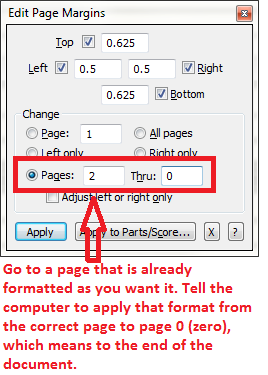
Another method (quick and dirty) is to go to a page the is formatted as you wish the rest to be, and to use the Page Tool > Edit Page Margins (different from Edit System Margins) to apply that page's format to the rest of the document (to "page 0").


The disadvantage compared to Peter's method is that whenever editing or reformatting adds additional pages, you will have to repeat this process.

Comment actions Permalink

Please sign in to leave a comment.