Does anyone know how to make the ? boxes invisible. I have to use a non-standard set-up with this client's in-house font and templates. The missing characters used to just be blank, these boxes make an upgrade impossible. 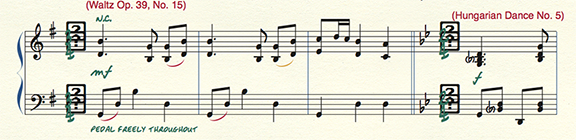


Finale 25 (with latest updates). Mac OS 10.11.6. This occurs within the program, but it does also print. It's possible this occurs because the client's font isn't Unicode, but that isn't likely to change anytime soon. This client has been on Finale 2012 until now, and it's not a problem there or earlier versions. I checked a file in Finale 2014.5 and it's also a problem there. In 2014.5 it displays default numbers when "substitute font for missing unicode characters" is checked, ? boxes when it's unchecked. It's a ? box either way in F25.

Thanks for the info Sean.
It looks like those ? characters are appearing in your file as Finale's attempt to create a regular time signature, but the absence of glyphs in the first handful of slots is causing the issue.
One way around this (since you are using expressions to create your time signatures) is to open Staff Attributes (double-click on the staff with the Staff tool) and deselect the Time Signature in Score and the Time Signature in Parts options in the Items to Display section. If you do use Finale's regularly generated time signatures elsewhere in your score, you can create a staff style with the same settings deactivated and apply it to regions of your score that use expressions for time signatures.
Hope this helps!

On a Mac, fonts compiled before Apple's 2012 compatibility guidelines (or those that ignore it) can have major issues. The only way to fix it is to update the font(s). Being that the 15 year old, in-house font is giving you grief, that is certainly the problem.
In the short term, use the MakeMusic fonts for such symbols until you can apply the real fix.
On the old, locked forum, a number of people have been howling at the moon that certain old font sets have been causing problems in Finale 2012, worse in 2014/2014.5 and give major grief in 25. When pointed out that these fonts were old, the comeback is always, "but they work fine in 2011 (or older)". I don't doubt it for a second.
Please sign in to leave a comment.
6 comments
Date Votes