PC windows 10 Finale print music 2014.
When i playback the tied notes always sound separately. Am i missing something obvious? thanks.


Hi Robert,
A couple of things I am curious about. Are these ties across barlines primarily by any chance? And if so, does the note appear to go up and down in pitch as if the note was altered at the beginning of the tie, but then is not?
Also, would you be able to send a screenshot of how those tied notes appear on your page?
Hi Robert,
Thanks for that info. It actually looks like, based on the color of that marking that is a Smart Shape slur rather than a tie. If you delete that marking and then choose the Simple Entry tool (eighth note icon), use the arrow keys to navigate to the first C of the two, and then press the "T" key on your computer keyboard, does the tie then work properly?


Please sign in to leave a comment.
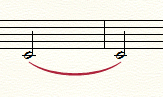 They both sound the same pitch but play individually one after the other when in playback.
8 comments
Date Votes