New post
Avatar
0

I am running Finale 2o14 on MacOS 10.7.5. Is there any way I can get percussion noteheads onto "normal" notes?

I am writing a percussion part that moves between tuned and untuned instruments and want to use, for example, a whole note with an 'x' in it.

It seems the Special Tools are specific to either percussion or non-percussion and I can't copy from one document to another using Mass Mover.

Hopefully the issue is surmountable as it would help me enormously.

Thanks.

Ryszard

6 comments

Date Votes
Avatar
0

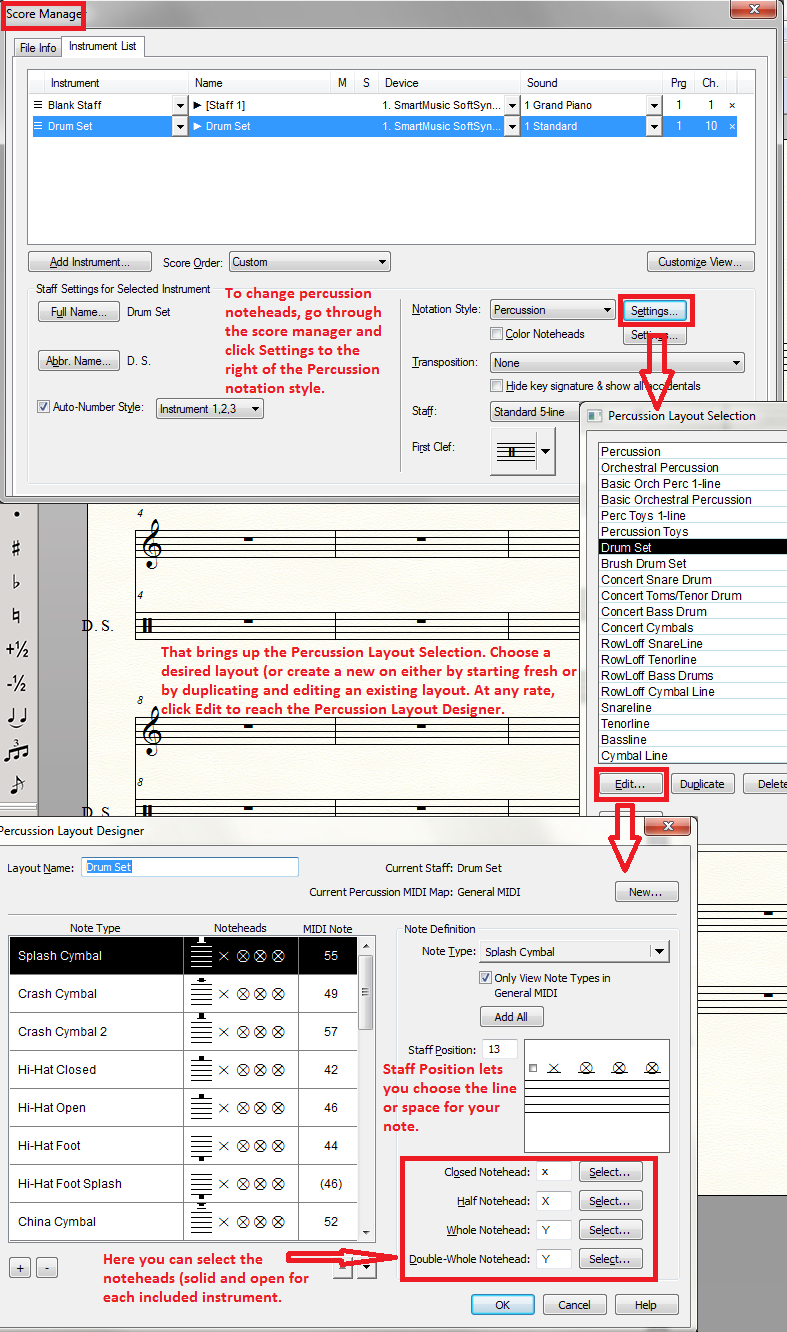
To pick shapes for Percussion, you have to go through the Score Manager and Percussion Layout Designer.


Comment actions Permalink
Avatar
0

Thanks Adrian,

The only problem is that the score manager changes the whole staff, not just a small section. Elsewhere in the part I am notating tuned percussion parts, which then become unintelligible.

If Finale was able to make all notehead possibilities available in the Special Tools palette, along with a create notehead shape, that would allow for much greater flexibility of use.

Here's hoping,

Ryszard

Comment actions Permalink
Avatar
0

Hi Ryszard,


Quick question: Perhaps I am misunderstanding you, but it sounds like the Note Shape tool is not allowing you to change certain noteheads to the noteheads you wish to use. The Note Shape tool should allow you to do this (here is a user manual article with more details on Note Shapes in case it helps).


The one limitation here would be creating a your own custom notehead. The Note Shape tool will always use the default music font (unless you have dictated an independent Notehead font in Staff Attributes or with a Staff Style). You can choose to use a blank notehead and place Shape Expressions (a bit meticulous), or create a custom font to use as the independent Notehead font. That latter option has a bit of a learning curve, but some who undertake that task find it beneficial.


All of that being said, if you are running into some unexpected behavior with the Note Shape tool, please let us know!

Comment actions Permalink
Avatar
0

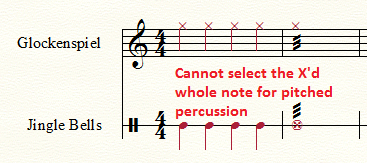
Ryszard is correct that the X-whole note head does not appear in the selection box (Maestro Symbol) offered for the Notehead Tool with pitched percussion (i.e. Glock). The same limited selection is offered when using the Utilities > Change > Notehead option.


Comment actions Permalink
Avatar
1

Ah, I see, good catch. Thanks for clarifying!


Yes, Finale will automatically use Maestro Percussion in the Symbol Selection dialog box for (what appears to be) most Percussion instruments. For pitched percussion, it will use the default music font. 


One way around this I see is to open Staff Attributes (double-click the staff with the Staff tool), select the Notehead font option in the Independent Elements section, click Select, and choose Maestro Percussion to use it for that staff. 


The Note Shape tool should then pull up the desired symbols when used on the pitched percussion staff. You can also do this for a select region of measures in a staff by defining a staff style with the same settings and then applying the new staff style to a region of measures.


Hope this helps!

Comment actions Permalink
Avatar
0

That is useful to know. Thank you.

Comment actions Permalink

Please sign in to leave a comment.