New post
Avatar
0

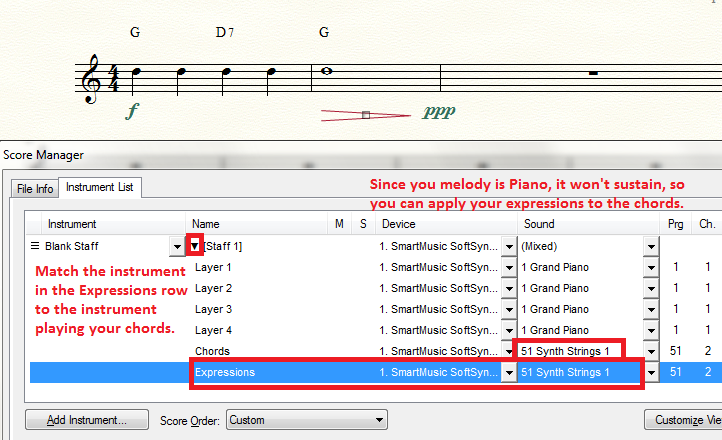
I have placed a fade-out (diminish) at the end of my song with a "pp". It works fine The chords (with the fret boards) do NOT fade out with the melody. They don't diminish at all. The melody is on a piano. The chords are on a clean electric guitar in the same piano layer as the piano melody. Changing the expression's  instrument makes no difference. Does anyone know how to make both fade out in sync? Is the company reading these? If there is no fix, this is a BUG.

Win 7 Finale 2014.5

3 comments

Date Votes
Avatar
0

Since your piano will not sustain, you can afford to apply the expressions to the instrument playing your chords. It's not an ideal situation, but it works as far as it goes.

Comment actions Permalink
Avatar
0

I DID that. I said so in my original comment. It didn't work for me. Is there anything I need to do besides ONLY change the expression line? My "pp" line is above the staff. Does it have to be below the staff? Do I need a "ppp" instead? Will this change make BOTH the piano and the guitar fade out?

Comment actions Permalink
Avatar
0

A diminuendo will not affect a sustained piano note any more a dim. will affect the rate of decay when one plays the note on a piano. If your guitar patch is handled the same way as a piano note (by the sound designer), that is, if the volume is governed solely by the Note Velocity (rather than by another controller that controls the Volume of sustaining instruments such as a violin or clarinet), then no dynamic changes noted in your music will affect the playback of your sustained chords or piano notes.

Sorry I missed your reference to changing the Expression setting. If that doesn't work, I do not know what else will. What happens if you change your Chords and Expressions settings to strings (as an experiment)?

Comment actions Permalink

Please sign in to leave a comment.