New post
Avatar
0

Windows 10

I have started a piece with several staves:  piano, choir.  I have extra staves for flute, violin, viola, etc.  However, I did not enter the instruments when I was originating the full score.  When I play the flute, violin, etc.  it all has the sound of a piano.  Am I able to rescore each staff to the intended instrument or do I have to start from scratch?


Micheal

5 comments

Date Votes
Avatar
0

Are you using the "full Finale”, or one of its smaller siblings?

What version? - v25? - 2014.5? - 2014? - 2012? - 2011?

Comment actions Permalink
Avatar
0

I am using Finale 2014.5.  It is not the "full Finale."


Micheal

Comment actions Permalink
Avatar
0

By not full Finale, do you mean PrintMusic? Your description of what you have sounds contradictory. I am going to assume you have full Finale, just not the latest upgrade.

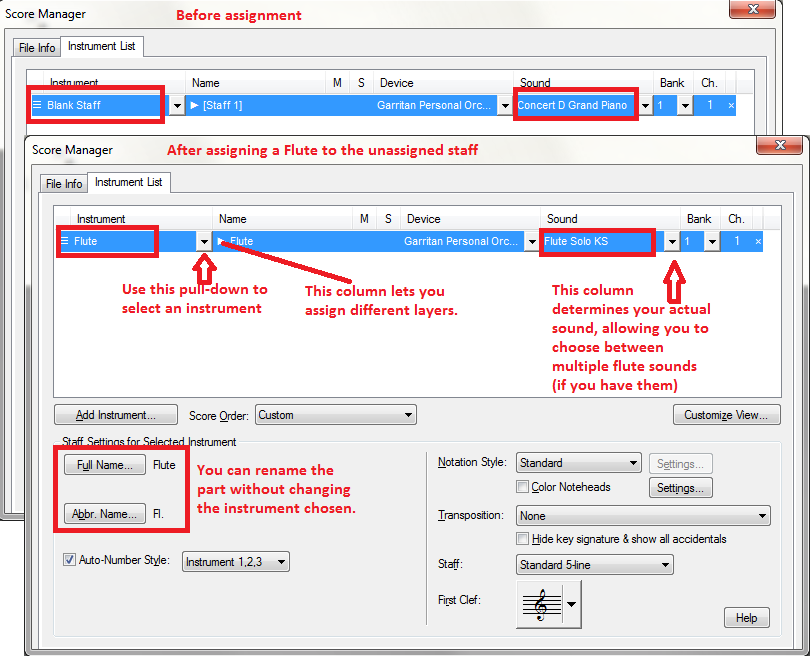
To define your "unassigned" staves, you need to go to Windows > Score Manager. In the Score Manager you can choose instruments for your various staves. If you select your instrument in the leftmost column, Finale will assign instrument sounds according to the preference listed in MIDI/Audio > Sound Map Priority.


Comment actions Permalink
Avatar
0

yes, I guess it is Print Music.  I did not upgrade to the latest Finale upgrade because there were too many bugs.  I bought Finale last July, then the upgrade was offered in August.  I was not going to pay  twice in less than a month, but I did try the free upgrade.

Comment actions Permalink
Avatar
0

Michael,


If you open the Score Manager or Instrument List whichever you have, you should see something like Adrian's post above, but with a row for each voice part (assuming you entered it originally like SATB) and two for the piano (though it could be combined into a single group consisting of 2 staves, and the choir could be a single group of 4 staves depending on how you originally entered it).

The piano will be set to the same channel and same sound most likely. The choir parts may all be set to the same channel together and same sound, though they could be 4 different channels and 4 different "voice" sounds.

At any rate, when you added the new staves, say, for Violin, it most likely just defaulted to the Piano sound, possibly on the same channel.

What you need to do is go into the IL or SM and find the staff for Violin and see what it says - you should change the pull down menus and channels. If the piano is on channel 1, and the choir on 2-5 or something like that, put the Violin on the next open number (or if there's a gap between say 1 and the next number, put it on 2). Then select the Violin sound from the pull down menu.

Traditionally, these sent MIDI messages as well (so you could switch from internal software instruments to external synths if you wanted to), so each instrument you need to be a different sound needs to be on its own channel, and obviously you need to select that sound for it.


So it could be something like this:


Piano Channel 1

Choir Channel 2

Violin Channel 3

Flute Channel 4


Traditionally, you were limited to 16 channels per device, so most people would put 2 staves for Piano on just 1 channel, because both the left and right hand are really playing the same sound.


Whether you do this for Choir or individual strings really depends on if you've used up all your channels or not. So you could put Violin and Viola on the same "strings" patch (or both a violin sound, etc.) on the same channel if you'd like.


But you could absolutely have Violin on its own channel with a Violin sound, Viola on its own channel with its own sound, Cello on its own channel with its own sound, etc. If you use setup wizard, this is what's going to happen automatically.


And by the way, traditionally, what happens on one Channel stays on that channel, so for example, if you put both the left and right hand staves of a piano on the same channel, if you crescendo in the RH, it crescendos in the LH too. That's typical, but sometimes pieces call for individual dynamics in each hand. The same would be true if you used two Violins (1 and 2) for a String Quartet - if they're on the same channel and same sound, any dynamics one does the other will do (especially if you port out to MIDI). But, if you put one on 1 and the other on 2, even if you pick the same exact sound, they'll respond to dynamics differently.


So you always have more control with each staff on its own channel - until you run out of channels...then you have to start condensing. Finale has always allowed a lot more than 16, but in some cases that will mess up some synths.

Comment actions Permalink

Please sign in to leave a comment.