I have very basic instrumentation set up, using the wizard (4 instruments) AFTER, I have written my score, is there a way to insert a new instrument? Thanks
(Finale PrintMusic 2011, Windows XP)


Do you want to add a new instrument STAFF?
Or do you want the Trumpet to now be a Trombone or something?
I'll assume the former since all your existing instruments are treble clef instruments.
Go to the staff tool and then the menu item it puts up, and choose "New Staff". You can do it manually or with the Setup Wizard.
I just started with a SW Garritan String 4tet. Then I did New Staff and added a Trombone using the SW, which it placed at the bottom of the score.
It also shows up on the instrument list so that staff is assigned to that sound - which you can change as necessary (like mine came up on channel 17 but I'd put it on channel 5 as the 5th instrument).
I used 2010 full, but I think Print Music should have a staff tool and the ability to add staves to a score. But do it by the staff, not by the instrument list. It looks like on yours you may not have the "new instrument" option as the only thing I see at the bottom is "Send Patches Before Play" - usually there's more.

Another variation of this question: How to break an instrument out of a group?
I had a Rhythm Staff, change it to a two-stave organ and then tried to add an E. Guitar part. The staff shows on the Score (Page View), but the E. Guitar Part does not appear in the Score Manager (except, somehow, in the Drop-Down Menu under the Organ Part. Can't figure out how to get to show as a separate Part in Score Manager (where I can easily see what VST instrument is assigned)
Thanks

Adrian -
I still use the way I learned to add a staff (select the staff below where I want to Add Staves). I guess I should add the Score Manager.
I'm not certain what I did to get myself in this situation, but I attached a screen shot of what I have. I want to move the E. Guitar out of the Organ part and have it display as a separate part like the rest of the staves on the score.
Thanks,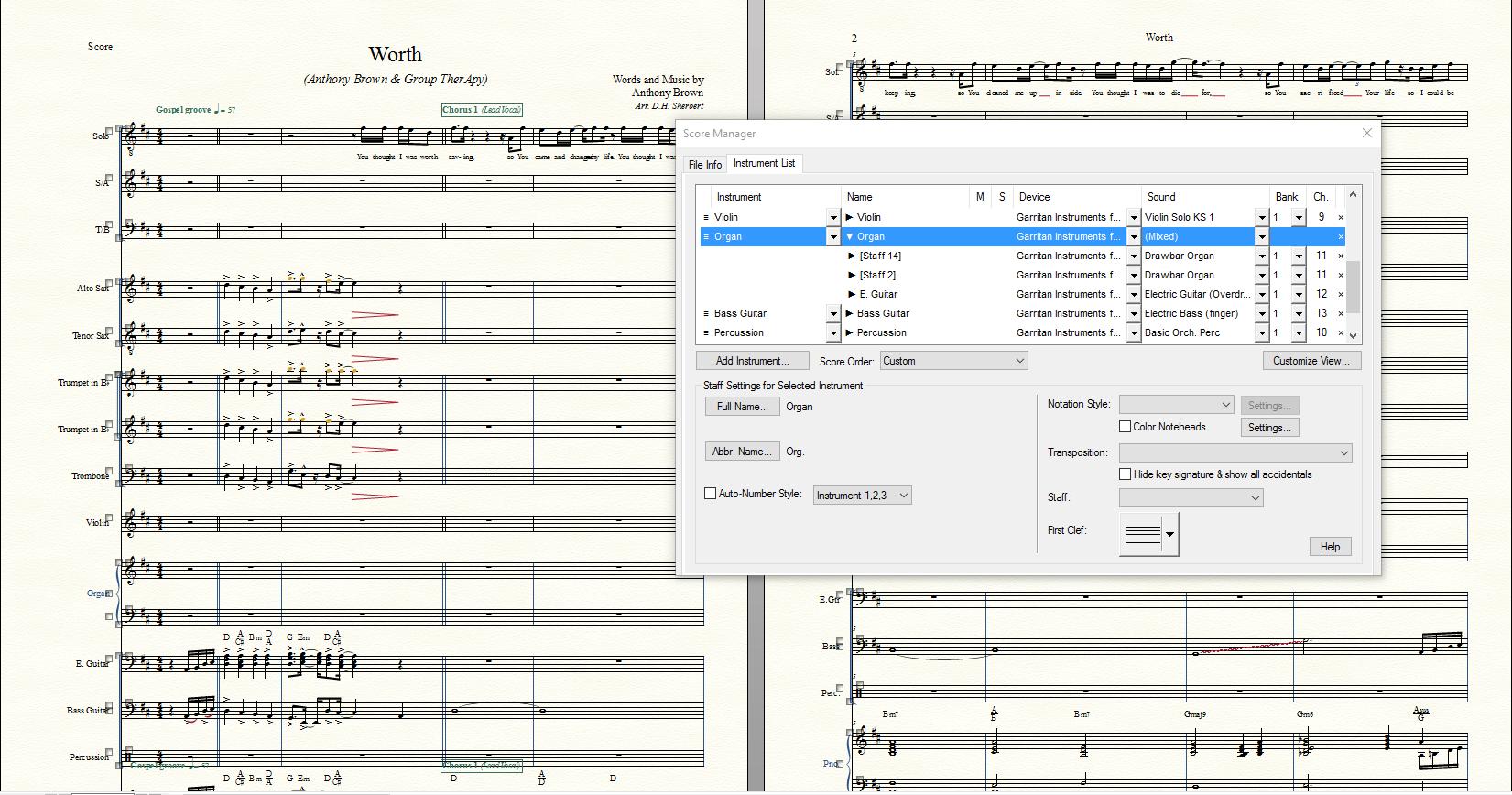
Doug
Please sign in to leave a comment.

9 comments
Date Votes