New post
Avatar
0

I was accustiomed to a much older version of Finale (2005); I just installed Finale 25 on a McBook Pro (OSX YOSEMITE), and I am a bit overwhelmed by the extent of all features. However, a couple of things I don't understand:

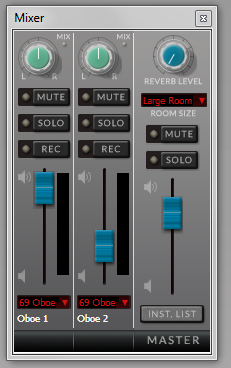
- in order to provide support to the various voices of a choir (SATB), I used to export the audio file of each row and then use an external mixer to create an .mp3 file with say Soprano in evidence and the rest in background. I understand Finale 25 allow me to actually mix in real time, but it doesn't look as I can export the mixed sound to a .wav file (by the way, why has .mp3 disappeared ?). Bu if I cancel the 3 non-relevant tracks and export each voice only, I always get the Soprano one, in the first case I am trying, with correct time length, and all the others shortened by about 25% (2' 15" vs. 3' ). I could include attachments to show this.

- I am a bit confused on how to assign specific instruments to specific rows, but thia is just my learning problem.

Thanks

4 comments

Date Votes
Avatar
0

The audio file format option depends on your choice of playback device.

Try

MIDI/Audio menu > Play Finale Through MIDI

and you will get the .MP3 option.


Also, take a good look at the Score Manager’s chiclet Instrument List.

It lets you add instruments (staves) easily.


To change instrument, use the utility

Utilities menu > Change Instrument…

Comment actions Permalink
Avatar
0

When you say "shorter" do you mean that playback stopped before the end of the file, or that the tempo was faster?


If you mean the tempi were different, this is probably because of Human Playback, which calculates the tempo brand-new every time you hit Play after an edit. It doesn't calculate it exactly the same each time (though 25% seems excessive!)


The way around this is to turn off Human Playback. If you still want it on for playback, apply the Human Playback Plugin instead, which freezes the Human Playback and doesn't recalculate it. Then you should be able to export the audio from each staff and combine the audio tracks in Audacity (free) or your favourite audio editor and the tempi should match up.


Let us know if this solves it.

Comment actions Permalink
Avatar
0

I'm not sure why the Finale (not the Aria) Mixer (from the Windows Menu) will not allow you to export the file multiple times (under different fileNames) with different mixes to feature each choral voice in each export.


Admittedly a lot of changes (many of them good) have occurred since Finale 2005, but learning to use them all is a sizable leap (still, worth the effort).

Comment actions Permalink
Avatar
0

Thanks everybody.

- to Peter: got you, all advises are useful and correct

- to Cristopher: the tempo was faster. I tried turning Human Playback off, but it still doesn.t work. I'll look into the plugin, however, as I found that the use of the Finale Mixer actually exports audio files with the mixed levels, this solves my problem even faster, I don't have to turn to Audacity for the mixage. This also relates to Adrian's tip.

I agree, it is a big leap, it will take time. However, my immediate problems are sorted.
Again, thanks to all.

Luciano

Comment actions Permalink

Please sign in to leave a comment.