New post
Avatar
0

XP - Finale 2014d


I have been trying to construct a smart shape sostenuto hold and release mark per Gardner Read p. 318 and the best I have been able to do, after hours of struggle, gives me a symbol in the wrong clef with the handle a couple of inches away, sometimes off the page.  Obviously either I am doing something wrong or there is something wrong with the smart shape process.  How can I fix this?

10 comments

Date Votes
Avatar
0

Unfortunately I do not have Gardner Read’s book any longer.

Could you attach a picture of the {hold and release mark}?

Comment actions Permalink
Avatar
0

I am attaching the relevant paragraph of Read's book showing the mark in question (wondering why that should be necessary), and two measures showing, in the first measure, where Finale wants to assign the mark, and in the second, where it belongs, having pulled it into place by the handle.  In the first measure the handle is in the position where the mark should be.  (Not sure the measure image is included, getting errors with the placement.  The classic forum would not have that problem.)

Wondering why MakeMusic does not include this mark in the basic library.  They include others of less use.


Comment actions Permalink
Avatar
0

I'll try again to post the image of the measure placement.  Maybe this new forum cannot handle more than one image at a time -- Like AOL back around 1990.

It flashes 100%, but nothing appears.  Sorry.

Comment actions Permalink
Avatar
0

Trying again to upload the images of the relevant measures.   Showing the sostenuo mark as assigned in measure 33 and pulled into place via the handles in measure 34.  Assigning the mark in the normal way places the handle where the mark should go -- where the mark is in measure 34, after dragging the handle off the score.

Comment actions Permalink
Avatar
0

It amuses me when folks refer to measure numbers after they have cropped them out. I see this a lot; folks forget that the excerpt no longer shows the measure numbers. Still, in this example one can imagine that since there are only two measures, they are 33 and 34.

Comment actions Permalink
Avatar
0

Your imagination works well. 33 does come before 34.

Comment actions Permalink
Avatar
0

Hi Ben:

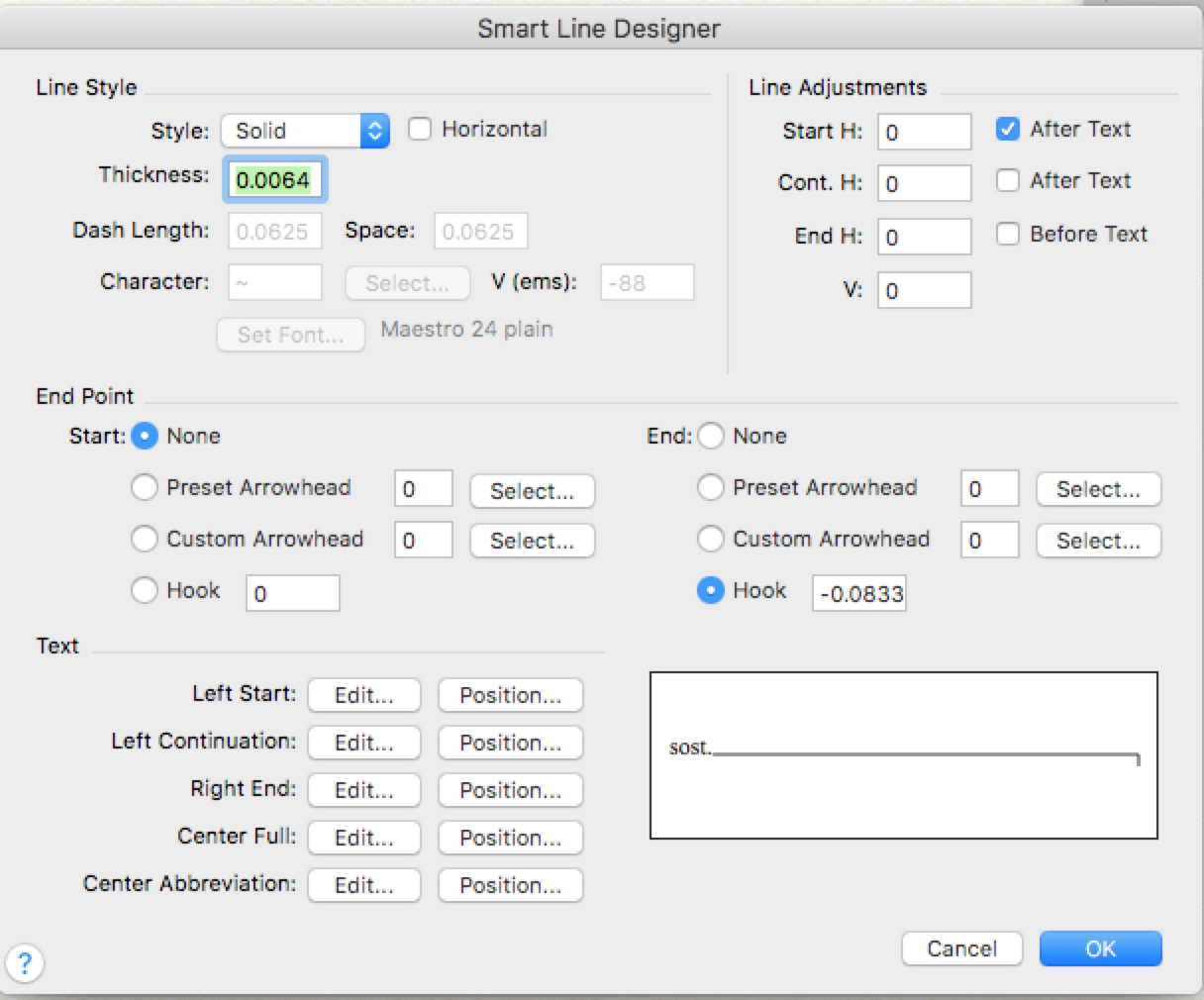
I made a custom Smart line with these settings. Works pretty well. I entered "sost." for the Left Start text. S.P. would work too. End point hook is -24 evpus. And make sure "Horizontal" is unchecked so the line can be slanted.

Cheers,

Michael

Comment actions Permalink
Avatar
0

Thanks, Michael,

I'm not sure if what you show here is actually workable for all applications.  Namely, if the length is fixed, one would have to create a new mark for every position where it would be needed.  And if you slanted the line, would that slant the "sost." as well?  And I didn't find the smart line designer box you showed.  Maybe you are using a different version.  I am working with 14d.

Anyhow, I went back to the smart shape designer box, selected the "line" icon, and drew a slanted line with hook directly above the circle, and saved it as No. 13 in the selection box.  It works fine.  It turns out my problem with the previous effort was that I drew the shape too far from the circle, which apparently becomes the handle for the shape when applied to the score.  (It would be nice if that were documented somewhere.)

Doing it this way I have a permanent shape which is immediately available on call, can be placed easily and accurately, and produces eight sub-handles ( as with shapes in general, such as hairpins)  for in loco modification.  The shape is not connected to the text, so they can be placed and modified independently.

Comment actions Permalink
Avatar
0

One more problem.  Turns out that when I modify one instance of the shape in situ, it modifies all others assigned as well.  They need to be independently modifiable.  Do I have to duplicate instances in the selection box?  Or is there another way to make them independent of each other, like hairpins, for example?  Changing the length of one hairpin has no effect on the others.  The smart shape should be able to do the same. 

Comment actions Permalink
Avatar
0

Hi Ben:


Apologies I haven't gotten back sooner. I made a little video on Mac and Win. You can do all this in Finale 2014d as well. 

I show how to get to the Custom Smart Line Tool. Ctrl + Click on the tool on Windows.

I create the marking and assign it a metatool. Shift + s (or another letter) on Windows or Mac to assign the metatool.

I show 3 shapes are independent, can be aligned horizontally, and text does not rotate with the shape.

If you want a fixed length line, I would recommend a shape expression. Again, assign it to a metatool so each instance in the score can be independently modified. 

I'd also refer you to the documentation on how to create Pedal markings for some additional ideas.


Cheers,

Michael Johnson

VP, Professional Notation

MakeMusic


Comment actions Permalink

Please sign in to leave a comment.