New post
Avatar
0

Hello,

I'm currently in the process of editing a concert band score in finale 2014.5 on Windows 10. Though tonal, I prefer the look of a keyless score for chromatic/modal works, so for clarity, my score name insert is "Transposed Score". I like to put the score/part name insert at the top of the rest of the score as well, where finale defaults the title of the piece. However, I'd rather it just says "Score" instead of "Transposed Score" on every page except the first page. Obviously I could just type it in, but then I'd need to make a duplicate copy of the score so that the parts can have their correct insert at the same location.

I'm sure there must be a way to either hide the "Transposed" in parts and have the insert as just "Score", or to have the "Score" on page 2 onwards be something else that doesn't interfere with the score/part name insert. I just don't know how to go about doing it.

Any tips?

Thanks,

-Michael

9 comments

Date Votes
Avatar
1
  1. You need to put a new text field in the header (or wherever) on pages 2 through 0 (zero means final page).
  2. In this new text field you need to pull the text menu down to "Inserts" and use it to enter the "Part/Score Name."
  3. If you want "Transposed Score" to only appear on page 1 of the score, then actually type the words "Transposed Score" into the (separate) text field on page 1, and just enter (restore) the label "Score" on the Info tab of the Score Manager. That will put the part name into each part as well as pages 2-the last page of the score.
  4. You will want to unlink the Transposed Score text field from all parts so you can delete it in each part. You may want add a "Score/Part" field to page 1 of your score and unlink it after you create your parts so you can drag it off the page of your full score.


(Personally, I'd put "Transposed Score" on every page of the full score. It's easier as well as more informative if pages ever get separated.)

Comment actions Permalink
Avatar
0

Thanks so much! How hard is it to put the default Engraver font black box around the new text box?
And I suppose I could put it on each, but depending on the title of the piece (undecided) , it may end up taking up 2/3 of the header haha

Comment actions Permalink
Avatar
0

I think enclosures are only integral to expressions, not text items.

Comment actions Permalink
Avatar
0

I'm not quite sure I know what you mean. I'm talking about the box that appears around the score/part name by default when the engraver (not maestro) font is selected.

Comment actions Permalink
Avatar
0

Okay. The templates/setup process I use does not put a frame around the Part/Score name, but I found out how that works.

To put a frame around a text object...

  1. Highlight the text (or text insert) as if you were going to change its size or style.
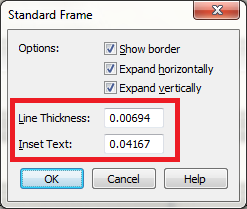
  2. Use the Text menu to select "Standard Frame."
  3. By defining the Line Thickness and Inset, you make the frame appear around the text.


Hope that helps. I certainly enjoyed learning something new. One can apparently apply this to any text field fairly easily. The thickness and Inset values are the ones from the Engraved Score Name generated automatically by the program..

Comment actions Permalink
Avatar
0

Michael Nunes,


You wrote:

“ I'm talking about the box that appears around the score/part name by default when the engraver (not maestro) font is selected.”

Please explain your steps.

* What are your steps?

* Where are you selecting the Engraver font?

Comment actions Permalink
Avatar
0

Thanks so much Mr. Verkouteren! You've taught me a lot of new things haha!

And I was referring to the setup wizard's first frame, where you select size and font of your score. I like the look of orchestral engraver font over maestro font

Comment actions Permalink
Avatar
0

The box/frame apparently has nothing to do with the font used but is a feature included in some Templates and Document Styles/Ensembles but (like all Finale options) can be applied manually to documents that do not include it automatically. I frequently create my own templates for various purposes, so I have never encountered the frame around an instrument name, but it seems a good idea for the first page of a score/part, and I'm glad I found out how to create it thanks to your question.

Comment actions Permalink
Avatar
0

I see. Thanks for doing the research :) You've helped a lot!

Comment actions Permalink

Please sign in to leave a comment.