New post
Avatar
0

As you already know or at least from now on should know we are using national characters in Scandinavian countries. In Finnish language we have 3 special  chars ä,ö,å, often can be seen written as ae, oe, swedish o in English texts,   and the other countries have they own.  Is it possible to us national characters with Finale - I have version 25.2 for Win 10. 


7 comments

Date Votes
Avatar
0

Yes, it is possible to use font characters like ä, ö, å with Finale.

As a matter of fact, Finale does not have any problems with such font characters.


To enter the characters more easily, consider switching to a scandinavian keyboard layout.


You can switch your keyboard layout back when you are done.

Comment actions Permalink
Avatar
0

RE: "Finale does not have any problems with such font characters."  

This is NOT true in all cases.  I am using Logitech K120 keyboard and do not have problems with other applications with it.

If you create a score by route File->New->Document With Setup Wizard->Create New Ensemble->HANDWRITTEN Style, you can enter Title  in Score Info -screen by using 3 special  chars ä,ö,å and they show correctly, but when you confirm the screen by OK, special  chars ä,ö,å in Title or any other field do NOT show correctly.  But if you created a score by route File->New->Document With Setup Wizard->Create New Ensemble->ENGRAVED Style, national characters can be seen correctly also after OK confirmation.  I guess this is a bug in Finale version 25.2 for Win 10.   

You can verify it yourself by testing.    


Comment actions Permalink
Avatar
0

Sounds as if some fonts are and some are not compatible with non-English keyboards. Try using the "Submit a request" link above (in the gray bar) to ask MM for a list of which fonts are or are not compatible.

Comment actions Permalink
Avatar
0

Heikki Kauppi,


You wrote:

“RE: "Finale does not have any problems with such font characters."
This is NOT true in all cases. I am using Logitech K120 keyboard and do not have problems with other applications with it.
If you create a score by route File->New->Document With Setup Wizard->Create New Ensemble->HANDWRITTEN Style, you can enter Title in Score Info -screen by using 3 special chars ä,ö,å and they show correctly, but when you confirm the screen by OK, special chars ä,ö,å in Title or any other field do NOT show correctly.”


I could be wrong here, but As Far As I Can Tell, this problem is a problem with the Broadway Copyist Text font, not a problem with the Finale program.

Are you saying that you can make the Broadway Copyist Text font display the characters ä, ö, å correctly in other applications?

I can not.

On The Other Hand, If I change to the Broadway Copyist Text Extended font, I can make ö, ä, å display correctly, in Finale as well as in other applications.

Comment actions Permalink
Avatar
0

You are right. Thanks about quick answer.   I made the same test with Word and got same results as you.  Chars ä, ö, and å can be seen correctly when using the  Broadway Copyist Text Extended font, and the  problem concerns only the Broadway Copyist Text font. So your conclusion is correct.  But is it possible to change Finale to use automatically Broadway Copyist Text Extended font when selecting Handwritten Style for Document With Setup Wizard? Or should I simply avoid on using it?

Comment actions Permalink
Avatar
0

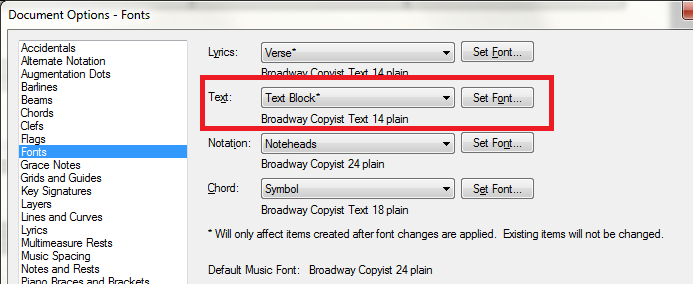
You can try changing the font option in your Document Options to see how that works (since it appears as if it will affect all text boxes and omit the characters in standard Bway Copyist) in your files. If it does work, then you could change the Handwritten Default Document to reflect the change.

Comment actions Permalink
Avatar
0

Heikki Kauppi,


Changing the Text Block font in the Document Options will only affect new text blocks.

Already existing text blocks will not be affected.


To get the Broadway Copyist Text Extended font in the title of new documents, edit the template Handwritten Style (in the folder Document Styles), and change the font in the template’s existing text blocks - and save.

From now on, new documents based on the template Handwritten Style will display the Broadway Copyist Text Extended font in all text blocks.

Obviously I am assuming that you create your new documents via the Document Setup Wizard.

Comment actions Permalink

Please sign in to leave a comment.