Thank you for including your operating system. What version of Finale are you using? In full Finale the Setup wizard should be almost self-explanatory.
Well, I have full Finale butI have tried every possible combination without success..Maybe I'm just not techy enough. Tom
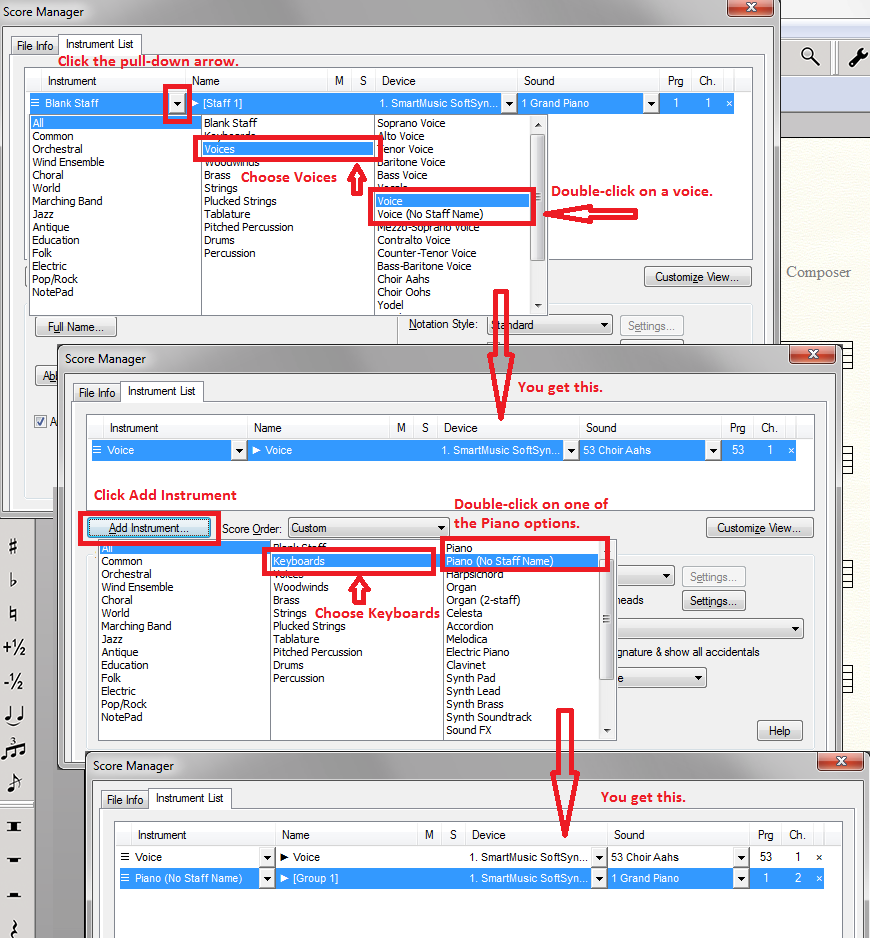
Okay... Open Finale. From the intro panel, choose Default Document. From Finale's Windows menu, choose Score Manager. On the Instrument Tab of the Score Manager you will see a pre-existing Blank staff. Click the pull-down arrow of the leftmost column In the second column of the resulting panel, choose Voices In the right-hand column, double-click your desired voice option. Click Add Instrument. In the second column of the resulting panel, choose Keyboards In the right-hand column double-click on the Piano of your choice. You should have your Piano /Vocal score ready for input.


4 comments
Date Votes