Using Sibelius 7 with Jabb3 on Windows 8. Hi-hats are barely audible, is it possible to increase the volume without increasing the volume on the rest of the drum kit please?
Regards, Pete Belben.


There are a few methods available.
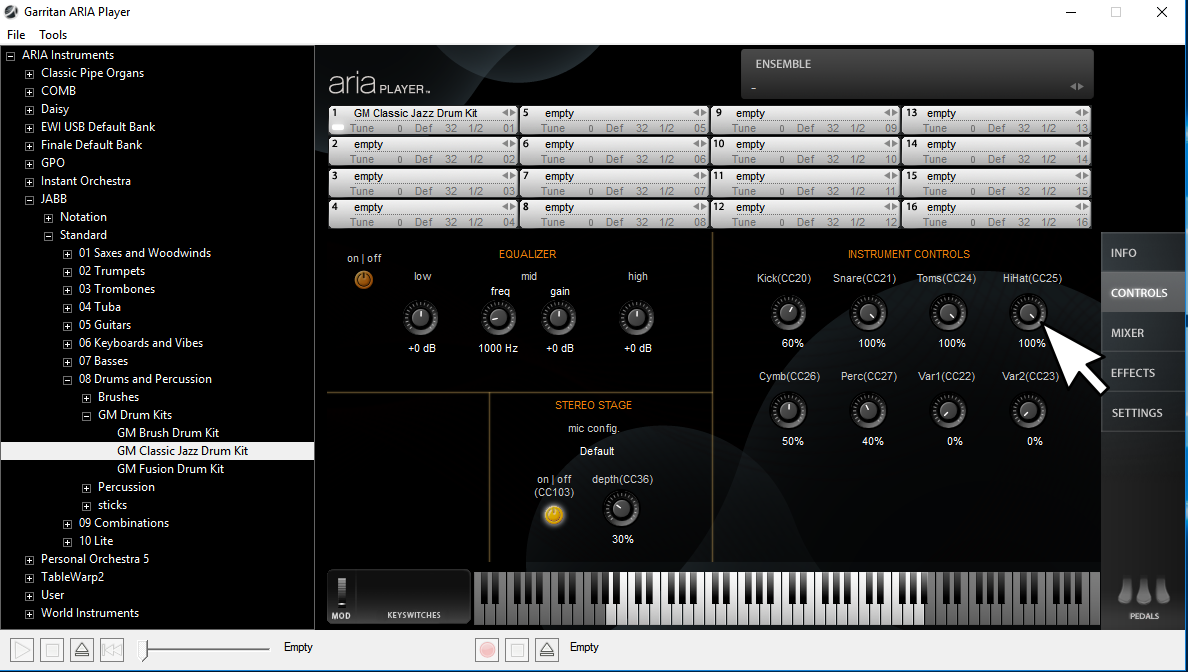
1. Look at the controls panel in the ARIA Player for the drum kit. Look for the HiHat(CC25) pot.
You can adjust the volumes of various kit pieces or groups of pieces from this control panel.
In some cases you might need to lower the volume of other kit pieces to get an appropriate kit mix, and then change the volume of the entire kit using the main mixer tab (or via CC7, which is Master Channel Volume).
If you want to automate these pots from a DAW or Score package, then have the track/stave send the corresponding MIDI Continuous Controller (CC) Event. I.E. Sending CC25,127 would turn the HiHat volume to max.
As you can see in the kit loaded below, there are independent volume levels for:
Kick (CC20)
Snare (CC21)
Toms (CC24)
HiHat (CC25)
Cymb (CC28)
Perc (CC27)
2. Another method is to increase note on velocity for each HiHat event. This would need to be done in your sequencer/DAW/score software. Note On velocity refers to 'how hard/fast' a key is struck. To give specific examples, we'd need to know what software you like to host/play ARIA sounds. Of course, if you are just playing/recording live, then tap the keys harder.
3. Sometimes one can enhance a drum kit's mix quality using an EQ, or a free multi-band compressor/limiter plugin such as ReaXComp. In this case I'd recommend giving the drum kit a dedicated ARIA instance, and then you could 'shape up' the dynamics of various frequency ranges in your drum kit's over all sound. There's a bit of information on using the EQ and Compressors to shape dynamics towards the end of this thread: http://forum.makemusic.com/default.aspx?f=5&m=481160&g=481681#m481681
Oops, I now see you're using Sibelius 7. Sorry I missed that before.
One method to tweak stuff for playback in ARIA from your score:
You can enter CC messages directly onto a score. Make either a technique or expression text entry, and precede the CC message you wish to send with a Tilde (~).
Example: ~C25,127
That would cause Sibelius to send a CC25,127 event. The tilde automatically hides the text so it does not get printed.
For more information on this technique, see page 598 in the Sibelius 7 Reference Manual: http://hub.sibelius.com/download/documentation/pdfs/sibelius713-reference-en.pdf
If you want to adjust the note-on velocity for individual notes, you can do so via the Playback Panel Inspector. See Page 129 of the Reference Manual.
Please sign in to leave a comment.
2 comments
Date Votes