New post
Avatar
0

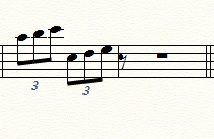
This happens whenever I change time signature to a shorter one (picture). If there's any rests at the end of the measure and (as in this example) I change a 6/4 to a 4/4 the rests pop up in the next measure. I didn't have this problem in the older version of finale!

You can see what I'm talking about in the leftmost measure. I can't even delete them


I use Finale 25 on a Mac (Sierra 10.12)

8 comments

Date Votes
Avatar
2

Actually the rest is not located in the next measure - it only looks that way.

You can delete the rest by navigating to the rest from the beginning of the measure.


By The Way:

You tell that you did not “have this problem in the older version of Finale”.

I could be wrong here, but I do not think that Finale has been changed here.

It is just a matter of whether “Rebar” is selected or de-selected.

Comment actions Permalink
Avatar
0

I have the same problem, and cannot delete the rests.  Peter, you say to navigate to the rest, but when I select the rest, I still cannot delete it.  Any suggestions?


Thank you.

Comment actions Permalink
Avatar
0

Rick Dwyer,


You wrote:

“… when I select the rest, I still cannot delete it …”


Please specify your steps so that we can try to reproduce the problem:

What OS?

What Finale version?

What are your steps to select the rest?

In what tool are you when the rest is selected?

Comment actions Permalink
Avatar
0

To delete a rest that "looks as if" it is in the next measure, use Speedy Entry to step through the notes of the measure (with the right-arrow key). When you have "arrowed" past the last note that appears in the measure, press the DELETE key (on a Windows machine) to erase subsequent notes or rests that appear to be in the following measure.

Comment actions Permalink
Avatar
0

Below are the steps  that produce the result.

  • From the Finale Launch screen I am scanning a part using SmartScore Lite, X2, 10
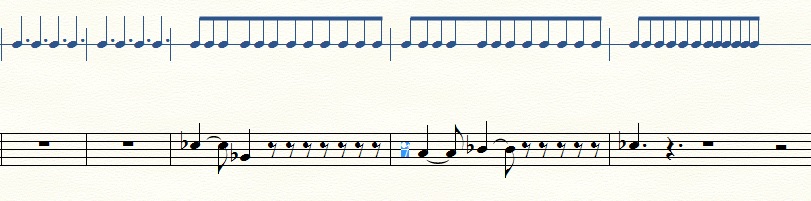
  • The score is in 12/8 time and below are a few measures resulting from the scan.  SmartScore doesn't scan everything correctly.  
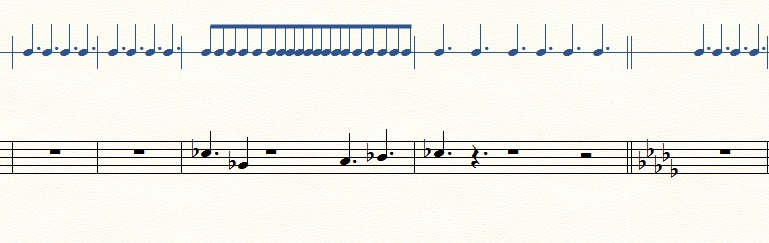
  • I edited the time signature in the third measure and selecting or not selecting rebar produces the following.
 
Using the Selection tool I select the first rest in the fourth measure, see below, and press the delete key.  The rest does not delete.
 
I am using Windows 10 with Finale version 2014.5.6359.
Comment actions Permalink
Avatar
1

Rick Dwyer,


You wrote:

“… Using the Selection tool I select the first rest in the fourth measure, see below …”


Your screen shot makes me suspect that the item you have selected, is not the eighth rest.


What did you do, to select - using the Selection Tool?

Did you single-click or double-click?


Have you tried selecting with the Speedy Entry Tool, or with the Simple Entry Tool?

Comment actions Permalink
Avatar
0

I tried with single-click and also with double-click, and repeats of each.  The rest did not go away.

I was able to delete it using the Speedy Entry Tool.  No success with Simple Entry Tool.

Thank you.

Comment actions Permalink
Avatar
0

Rick,

Does that mean your problem has been solved?

Comment actions Permalink

Please sign in to leave a comment.