New post
Avatar
0

I am experiencing difficulty in successfully notating music for the classical guitar. Among various challenges I am experiencing, a brief description of these includes achieving the correct note duration for each voice being played, changing stem direction within a voice, working with notating chords that involve more than 4 voices etc. I am working with layers for the voices but the issues I have listed seem to still plague me within each layer. Are there any users out there who use the product for classical guitar music and who may be able to offer me some guidance as to how they have solved these problems. I am using Finale 25 with an Apple Mac environment IOS Sierra v10.12.1. Thx Ron

3 comments

Date Votes
Avatar
0

Ron Dolan,


From your description it sounds like you do not use the option of notating multiple note heads on the same stem (= in the same layer) a.k.a. a chord.


You can put e. g. 6 notes on the same stem, thus having 6 notes of the same duration in the same layer.

Comment actions Permalink
Avatar
0

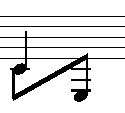
HI Peter, In classical guitar music, one often has the need for 2 voices (layers) sounding the same note. One of the notes could be a quarter note C and the other an eighth note

The lower eighth then links to another eighth note, a lower E on the Treble Clef. So the crotchet note has its stem direction upwards whereas the eighth note direction is down. The issue arises when I need to flip the direction of the stem of the eighth note upwards creating an angled beam between them. Finale has the beam tool in the special tools palette but it doesn’t work in this instance. The quarter note is entered in layer 1 and the eighth notes in layer 2. Nothing seems to work - any suggestions would be welcomed. Desperation has set in!

The issue arises when I need to flip the direction of the lower E-stem (eighth note) upwards. The connecting beam then is angled between them. Finale has the beam tool in the special tools palette but it doesn’t seem to work in this instance. The tool only the flips the beam in line with the note head and not above it.

I have entered the quarter note is in layer 1 and the eighth notes in layer 2. Nothing seems to work - any suggestions would be welcomed. Desperation has set in!

Thx Ron

Comment actions Permalink
Avatar
0

Ron Dolan,


You wrote:

In classical guitar music, one often has the need for 2 voices (layers) sounding the same note. One of the notes could be a quarter note C and the other an eighth note

The lower eighth then links to another eighth note, a lower E on the Treble Clef. So the crotchet note has its stem direction upwards whereas the eighth note direction is down. The quarter note is entered in layer 1 and the eighth notes in layer 2. Nothing seems to work - any suggestions would be welcomed. Desperation has set in!

The issue arises when I need to flip the direction of the lower E-stem (eighth note) upwards. The connecting beam then is angled between them. Finale has the beam tool in the special tools palette but it doesn’t seem to work in this instance. The tool only the flips the beam in line with the note head and not above it.”


To “reverse” the stem on a beamed note, use the Special Tools Tool sub-tool Reverse Stem Tool.

To adjust the beam angle, use the sub-tool Beam Angle Tool.


Comment actions Permalink

Please sign in to leave a comment.