New post
Avatar
0

latest trial version of Finale Print Music on Mac OS Sierra

 I try to scan in a piece of sheet music, the select scanner gives error "scanner no found".  Outside of this app I can launch HP Scan and it can scan the image just fine using the HP Deskjet 8610 (with latest drivers).  I saved the file and relaunched printmusic an then selected TIFF image of the file scanned with HP. It did not recognize any music?

 

5 comments

Date Votes
Avatar
0

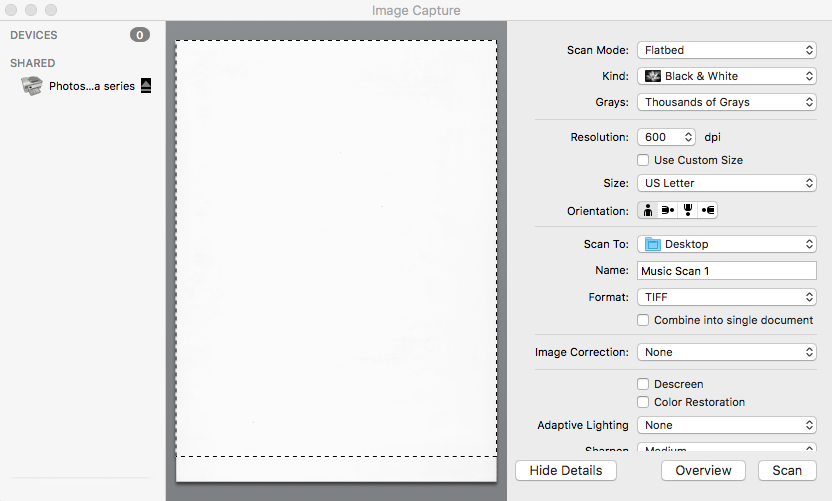
Use Apple's Image Capture.app to scan. It's part of the Mac OS and found in your Applications Folder. It works quite well with HP printers/scanners/all-in-ones. 

With HP, select Black & White — this is actually greyscale (Text  is what other printers call black and white).  For .tiff, the recommendation is 400–600dpi. Start with 600dpi — experiment and use what works best. I don't remember if 256 Greys or Thousands of Greys works best but that's another menu window. The window will look something like this.


The HP utilities... Yikes! Very few Mac users install them anymore. Frankly, they aren't that good and the Apple tools are.

Comment actions Permalink
Avatar
0

I have the same issue and it is frustrating that there is no help with this issue. I really need to scan several pieces of music for transposition and I am just loosing time with this scanning issue! =(

Comment actions Permalink
Avatar
0

Thanks Mike.  I successfully scanned the page using the method you suggested but I am getting an error.   Here is what happened:

Steps that produces the error:

PrintMusic/File/Import/TIFF file  - launches the SmartScore Lite

In SmartScore lite menu ADD file to list

Begin Recognition

The page is shown with the 1st note detected then the message:  Java Was Not Initialized Correctly

clicking OK on the message window gives another message that reads:

"While attempting to access "temp.XML" the
file manager reported an error.

Finale PrintMusic - Error occurred, ID = -3"

This is a new MAC mini and I just installed the latest Java version.

Comment actions Permalink
Avatar
0
Comment actions Permalink
Avatar
0

Problem Solved.  Forte requires legacy Java 32bit version 6.

Comment actions Permalink

Please sign in to leave a comment.