New post
Avatar
0

I would like to ask for the convenient way of typing a cadenza passage for piano, i.e. a bar without the restraint of time signature, 

if i type in a let-say fake 12/4 time signature for the cadenza passage, and then hide the time signature, all the time signature of other bars will be hidden,

I just want to hide that particular bar's time signature. is it a good way for typing cadenza?

how to solve this?

10 comments

Date Votes
Avatar
0

Ruby Tang,


You wrote:

« if i type in a let-say fake 12/4 time signature for the cadenza passage, and then hide the time signature, all the time signature of other bars will be hidden, »


From your description it sound like you are hiding the time signature in the Staff Attributes, right?


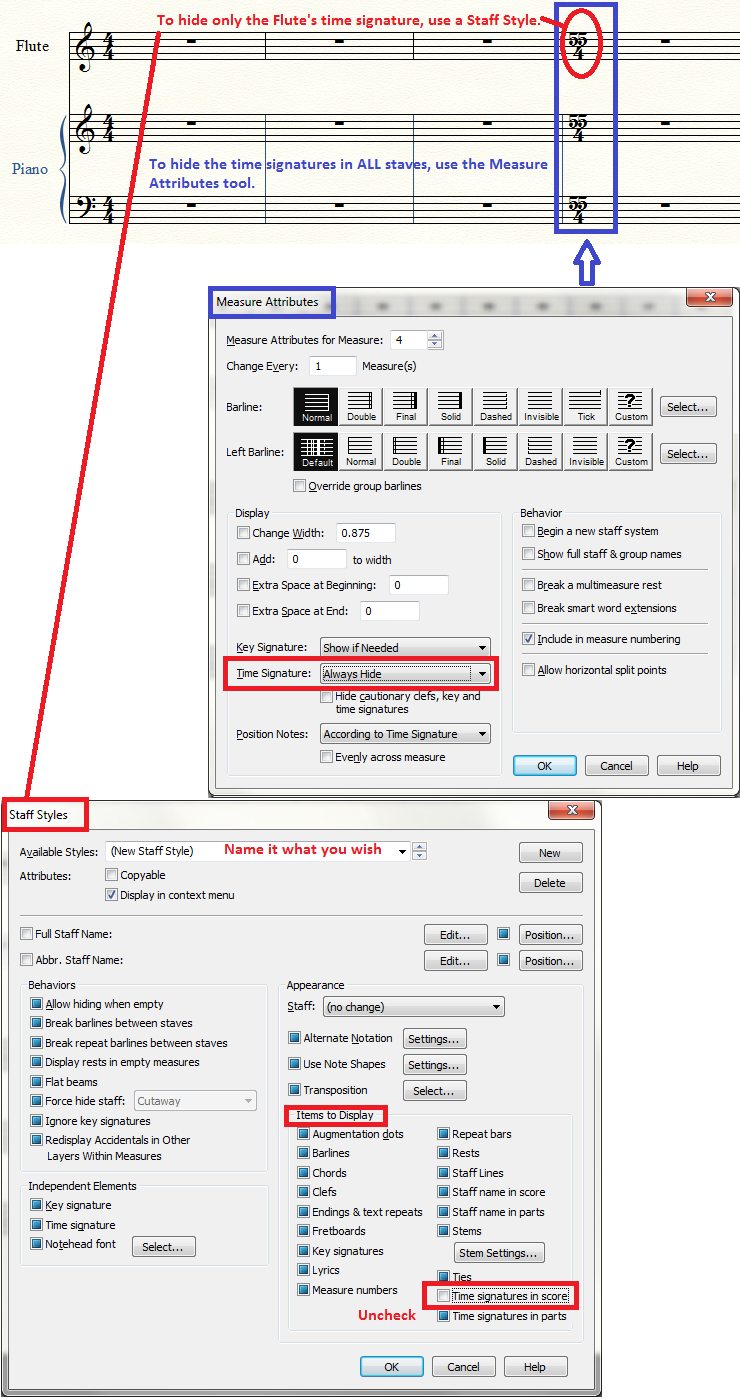
Indeed, de-selecting Time Signatures from the Staff Attributes pane {Items to Display} will hide the staff’s time signatures in all the measures of the entire document. Staff Attributes are “global” for all the measures in that staff. (horizontally)


To hide the time signature for all the staves in a single measure (vertically), use the Measure Attributes (in the Measure Tool).


To hide the time signature in a single staff, in a single measure, use a custom staff style.

Comment actions Permalink
Avatar
0

sorry I don't quite understand the meaning of the below two sentences. 

"To hide the time signature for all the staves in a single measure (vertically), use the Measure Attributes (in the Measure Tool).

To hide the time signature in a single staff, in a single measure, use a custom staff style."

all the staves in a single measure(vertically)? 

so, if I want to remove the time signature factor for a few bars, i need I create a new staff style for that few bars? 

Comment actions Permalink
Avatar
0

It depends whether you want the time signature hidden on one staff or on all staves of the system (the entire "stack")


Comment actions Permalink
Avatar
0

if I want to remove the time signature just for a few bars(like a cadenza passage) and then resume the time signature afterward (playing with other instruments), how can I do so?


Comment actions Permalink
Avatar
0

If you want to hide the time signature for a few measures …

- in all the staves, then use the Measure Attributes, as shown in J Adrian Verkouteren’s post.

- in a single staff, then use a custom staff style, as shown in J Adrian Verkouteren’s post.

NB: Defining the staff style is not enough. When your staff style is done, select the desired region, and apply the staff style to that region:

Staff menu > Apply Staff Style To > …

Comment actions Permalink
Avatar
0

There's a JW Plugin that handles cadenzas brilliantly, taking care of spacing issues that occur if you simply hide barlines. It's called JW Conceal Barlines.

Comment actions Permalink
Avatar
0

 sorry, where can I search it? the JW plugin handling cadenzas.

Comment actions Permalink
Avatar
0

You can find JW Conceal Barlines (and a lot of other useful Finale plug-ins by Jari Williamson) on Jari’s web site:

http://www.finaletips.nu/

Comment actions Permalink
Avatar
0

So plug-ins are the new features that I can add into the finale? they are also applicable to finale 25?

Comment actions Permalink
Avatar
0

So plug-ins are the new features that I can add into the Finale?


Actually, the existence of Finale plug-ins is not new at all.

Finale has supported plug-ins for many, many years.


They are also applicable to Finale 25?


One of the new features in Finale 25 is that it is 64-bit.

This means that all plug-ins have to be re-written from 32-bit to 64-bit.

When you download a third party plug-in for Finale 25, be careful that you download the 64-bit version, not the (older) 32-bit version.

Comment actions Permalink

Please sign in to leave a comment.