Is there a way to go about putting a notepad in a time signature? For example, instead of 4/4, I'd like it to display 4 and a quarter note underneath.


Such time signatures are sometimes called Orff time signatures - after the german composer Carl Orff.
One way to do Orff time signatures:
In this example let us say that you need a 6/8 time signature to display as
2
over
a dotted quarter
1) To get a “numerator” of 2, use the option of a different time signature for display, and choose a time signature with “numerator” 2 - e. g. 2/4.
2) To hide the “denominator”, use
Document Options - Time Signatures
to move the Bottom Symbol down WAAAAAY below the bottom of the page.
In that way the denominators will not print.
3) Use the Expression Tool to add the “note denominator”.
I would create a custom expression category for the “note denominators” - with automatic positioning settings.
The symbol of a dotted quarter note requires two elements: a quarter note, and a dot.
To get full control of the elements, create a shape expression.

My work around to insert a graphic to achieve a 4/4 + eighth.
I created a plus sign followed by an eighth note graphic in Photoshop.
Then, I created a custom time signature in Finale with composite to be a 2+2+2+3 over 8 and "More Options" to "Use a Different Time Signature for Display"
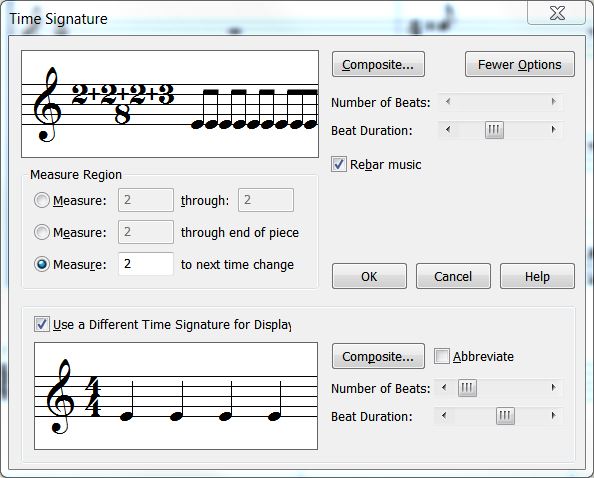
I placed the graphic next to the showing 4/a and the result looks like this:
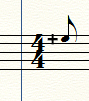
Then, of course, I had to use the "Measure" options to adjust the notes in the measure to give room for the graphic.
Here are two for you: a +eighth, and a + quarter in png format and then gif (each of which havetransparent backgrounds so you can place them in your score and not block music.
PNG

GIF

:-)
Vanessa
Please sign in to leave a comment.
2 comments
Date Votes