New post
Avatar
0

Hi. I'm using Finale 25, Version 25.5.0.290


I'm having issues merging two different staffs' contents into the same staff.  I understand this is done with layers.

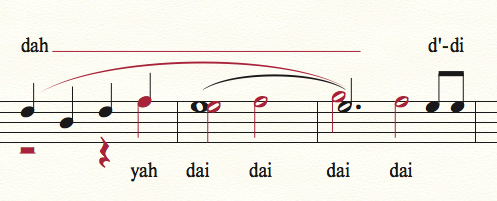
First is my before picture:

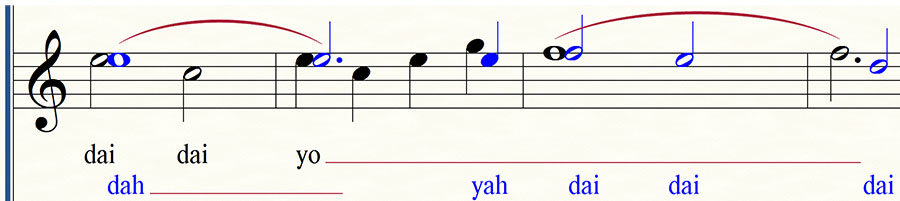
And here is my undesired after picture :

Here is what I did : 1) Changed note color for Layer 2 to blue, 2) Clicked on Layer 2, 3) Added all the stuff on the bottom staff to the top staff : a) Added dotted-half-rest plus quarter note to first measure, b) Added two half notes to second measure, c) Added two half notes to third measure, d) Added lyrics

Here are the undesirable results:

     1) in first measure you don't see a black and blue "F" note - they are a single note - though they are the same note (both "F" quarter notes), it seems important that they are considered separately since they carry different lyrics (see "before" picture)

     2) the "G" note in the third measure appears above the "E" instead of next to it (like what happened in measure 2). Perhaps this is expected in the 3rd measure since they are both half notes, however it makes me wonder if Clicking on Layer 2 doesn't really inform Finale that the notes being entered in Layer 2 are intended to be a different voice (see problem 3 for further support of this concern)

     3) the lyrics from the bottom staff appear at the same horizontal level as the lyrics from the top staff - I was hoping Layer 2 lyrics would appear "lower" and preferably in a blue font

So ... I am quite new to Finale, and was hoping others could enlighten me as to how I should have done this to get a more desirable outcome. :)

With thanks!

Mike

6 comments

Date Votes
Avatar
0

Hmm ... formatting of above message didn't happen quite correctly. When you see text to the right of the picture, it should actually appear just below the picture.  Sorry about that.

Comment actions Permalink
Avatar
1

You can move the high G in part 2 left using one of the advanced tools (icon a note with arrows pointing to the side.

If you configure your lyrics correctly (say one as verse and another as Section, you can use the second positioning arrow from the left in the lyric tool to move the line of lyrics for part 1 above the line (or just about anywhere else you want).


(Sorry to be so cryptic, but I am late for an appointment.)

Comment actions Permalink
Avatar
0

Finale is doing things correctly, according to the accepted rules of notation. It’s up to you to clarify things.


With distinctly varied parts on the same staff (not generally a good idea) I would suggest moving the layer one lyrics above the staff, while the layer two lyric line can remain below. (You also meed a slur over the melisma.) Otherwise, it’s very difficult to tell which lyric goes with which note. In the first measure, where you have the F notes overlapping, that’s correct, because they share the same notehead. The stems indicate that the note goes with both layers. The Gs in measure two don’t overlap, because they are different noteheads. The crossing notes also follow the rules.


If you feel that anything is unclear, you are free to move the notes as you please, but remember that most of the rules are there because over time, they have become what your singers expect to see.


This is how I would do it...


Comment actions Permalink
Avatar
0

And just out of curiosity, why did you change the layer two notes to blue? They are red, by default. And they all print black, anyway (unless you force the color print.)

Comment actions Permalink
Avatar
0

Lots of responses ... thanks to all responders.


Either the capability is not there or I haven't mastered the forums yet, but I cannot seem to be able to reply to the individual responses above.  So here is my summary response to all:

1) To Adrian : the "move the high G" idea worked great ... thanks

2) To Adrian : couldn't figure out the "section" versus "verse" idea, but using "Verse1" for primary verse and using "Verse2" for secondary voice allowed me to use the "click" feature to place the secondary voice lyrics below the intended notes. The tool automatically placed "Verse2" below "Verse1".

3) To Mike Rosen : ok ... that's COOL. Could you perchance save an musx file with that snippet in there for me to study it? I tried to recreate that but was not successful.  I would like to keep the Lyric 1 below the staff only because it is that way for the entire piece, and the Lyric 2 only exists for about 5% of the piece.  Lastly, I changed the layer two notes to blue because the red is hard for me to read for some reason (I have a tad of color blindness).  A bonus was that I was able to use the [ View -> Select Display Colors -> Checkbox : Layer colors apply to all layer items ] to have the Lyric 2 show up in the blue color also making it easier to identify and associate with the Layer 2 notes.  I do force the color print also for the pages that I would like to have this color assist on :)

Comment actions Permalink
Avatar
0

I hate to sound like a curmudgeon, but your solution is just wrong. As a singer, if I saw this, my first reaction would be WTF?


Send me an email to wawoodman at aol dot com, and I'll send you the Finale file.

Comment actions Permalink

Please sign in to leave a comment.