New post
Avatar
0

Please, help!


I am using Aria player and GPO5 instruments with finale. After a few minutes of playing, sound of piano dissapears. I have quite a powerful computer, RME soundcard, 32GB of Ram and a powerful fast hard disk. When I empty the slot and reload the piano instrument again, everything works fine. For a few minutes. Any ideas?

13 comments

Date Votes
Avatar
0

Windows or Mac?


What model of drive?  (I've had serious disk loss on read issues with some PNY SSD drives before, and ARIA was particularly sensitive to it).


Which Piano sound, and are there other instruments also loaded?


Does this happen with other scores/projects, or is it just in one?


How many instances of ARIA does the score in question use?


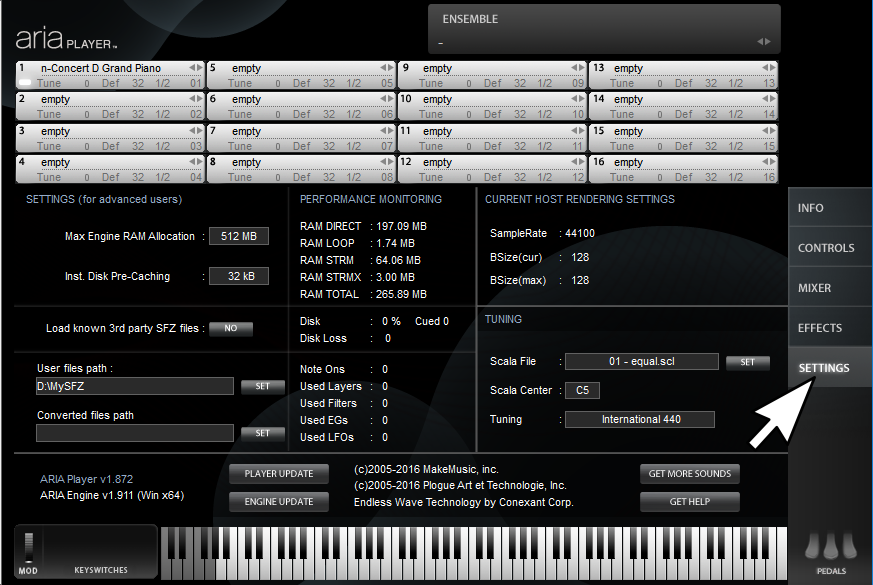
Could you open the offending ARIA Instance and make a screen shot of the settings tab after duplicating this glitch?


Note that if you've got a pretty big project going (and your RAM TOTAL is getting close to the MAX RAM) you might try increasing MAX Engine RAM.  You might try some different Pre Caching values as well.


Comment actions Permalink
Avatar
0

Hi. And thank you. I am using windows. I was writing a piece for clarinet and piano, using GPO5 library. My harddrive crashed a few months ago, I am using new WD 3 TB black edition since, supposingly fast and reliable model. So, when I write piano part, sound randomly dissapears, it actually hangs out. Clarinet part still works. I don˙t have to close finale, I just empty piano slot, reload the patch and voila - everything works nice. For a while. I set max ram allocation to 16 GB.

Comment actions Permalink
Avatar
0

I'm having the same problem with JABB3. I'm working on a big band piece and with only 12 bars of music so far, all of the instruments drop out, except for the bass. I'm new to Garritan products.

Details:

- Windows, 16 GB RAM. Quad Core i7 processor. Initially installed JABB3 on my small SSD drive, but after this problem, uninstalled and re-installed on main drive (64 bit) - problem persists.
- When all instruments are playing, the CPU is around 16% capacity (also running Chrome with several tabs open).
- I upped the RAM allocation to 768 MB (current RAM total for this piece is 288 MB) and upped pre-caching up to 64 KB
- Updated ARIA player and engine.
- My DAW is Cakewalk Sonar Home Studio
- I'm adding each instrument in a new ARIA instance - 14 tracks so far.
- Not using Auto-Legato, if that makes any difference.
- Before I updated the ARIA player, I was able to select "reload" for the instrument, and audio would return. After the update, I have to empty and browse for the instrument again.

I'm really frustrated at this point because I cannot go for more than five minutes without loosing instruments, and it's very tedious to re-add them so often.

Comment actions Permalink
Avatar
0

Is your new hard-drive holding the library content in an external USB box per chance?  I can't help but wonder if something isn't deciding to go to 'sleep' on you.  I get similar issues sometimes with one of my 'external' drives that is connected via USB.  Sometimes trying a different USB slot fixes it, but more often than not I end up needing to host samples on a drive that's not connected via USB (SATA in my case). 


Either way, it might not hurt to try different 'power saver' settings in Windows.  Disable any sleep timers and set everything to 'high performance' mode.  Just tap your windows key and type "power".  Choose "Power Options", and work your way though the settings (also see the advanced settings).


If that doesn't help out...

Disclaimer:  I don't work for MakeMusic, but years ago I had a hardware/driver problem so daunting I went this route to find a solution.


First (For Windows, not sure about Macs), look in your "C:\Program Files\Plogue\ARIA" folder and run "AriaReporter.exe".


This will archive all of ARIA's log files on your desktop in a tar.gz file. 

When Plogue engine stuff is running it generates logs in: "%USERPROFILE%\AppData\Roaming\Plogue" if you ever want to take a peek at them directly.


You might also want to run "dxdiag" which will generate a report about the hardware and drivers of your system. 

To do this  hold the "windows key" and tap your "r key".  Type "dxdiag" in the run dialog and tap "enter". 

After a few seconds you should see the DirectX Diagnostic Tool.  Click "save information" and you'll get an opportunity to save a text file to the location of your choice.


Next, consider submitting a support ticket.

Log into your MakeMusic User Account and try this link to file a support ticket.

Go ahead and include your log files with the help ticket, that'll save the time of them having to ask you for them before they can 'dig deeper' into your issue.


You might also try starting a thread with your logs attached at the Plogue Forum and see if that yields faster results, as Plogue are the people behind the ARIA engine (as well as the audio engine for many leading DAW and Notation products like Finale and Sibelius).  You can find an area in the forum for ARIA Engine related topics.

Comment actions Permalink
Avatar
0

Good info. I appreciate the help. My library content is on the same main drive that ARIA is on, so I guess I'll run those reports and get a support ticket going when I have some time in a day or two.

Comment actions Permalink
Avatar
0

Good luck...


The only other thing I can think to try off the top of my head is to be sure everything is up to date for both your host and ARIA (click all the update buttons in your DAW, and in ARIA).

Comment actions Permalink
Avatar
0

My sistem in installed on SSD disk and garritan libray on the internal disk. Mark, when you solve the problem, please, let me know. :)

Comment actions Permalink
Avatar
0

Cipka Pipka,


I once had a bad batch of PNY Brand SDD drives.

Click here for a record of my Saga  (Note, it's a really old thread, so please do NOT try installing anything from links provided there, as there have been many updates to everything Plogue since those days.  My PNY drives still don't work well in DAW applications to this day)


The SSD drives in question kept producing 'data loss' errors in the ARIA Settings tab.  I was never able to find a solution other than installing the ARIA Libraries on a different hard drive.


Based on this experience, have a look at the Settings tab inside ARIA after any problem arises.  Are any disk errors reported?


If so...

If you have another drive to try installing the libraries on (even if it's just a temporary situation on an external drive) it's worth a try.  If your problem goes away, you might see if there are any firmware or driver updates for the problem hard-drive.  If not, I'm afraid you'll most likely just need to host ARIA Libraries from a different drive (Or Contact Plogue and see if they can reproduce and find some kind of hack/fix).

Comment actions Permalink
Avatar
0

Cipka, I'll let you know. I haven't had a chance you to submit a ticket. Maybe tonight.

Comment actions Permalink
Avatar
0

I received a response to my Garritan support ticket. They suggestions trying the following:


- update sound card driver (mine was up-to-date)
- increase RAM in Aria Player
- consider using the Aria Player in 16 out mode with connected MIDI tracks (instead of using an Aria instance per instrument like I was doing)


The one I'm having trouble with is the third option. I'm very new to using a DAW, and I'm just not getting how to use Aria in 16 out mode with instruments mapped to tracks. I've read through the JABB3 and Sonar documentation, and neither one explains it at the basic level I need. I don't know if the Home Studio version of Sonar (which I have) doesn't support this or what. I've tried everything I can think of, but there's a lot I don't know yet about working with DAWs.


I'll ask Garritan support, but I wouldn't expect a response on the weekend. If you guys have some basic tips to point me in the right direction or know of a site that explains it clearly, I'd be grateful.

Comment actions Permalink
Avatar
0

I just happened to think.

Increasing the buffer size in your sound card might help as well.  Larger buffers will lead to latency, but will give the CPU more time to do its thing.  For most systems something between 128kb and 512kb should be enough, yet not cause absurd amounts of latency (a delay in the sound after tapping a key).  I do have one older laptop that needs a pretty big buffer (1024 samples with ASIO4ALL, a wdm to ASIO driver bridge) to be useable.


In Finale, as well as most DAWs, driver buffer size is changed in the "Audio Settings" area of the application.  If you are using an audio driver that doesn't have adjustable buffers, try some of the other drivers that might be available on your system.  I.E.  ASIO.

Comment actions Permalink
Avatar
0

Thanks, Brian. I've had the buffer at 512kb all along - I could try going with more, but it seems like my setup should be okay with 512. Still trying some things...

Comment actions Permalink
Avatar
0
Comment actions Permalink

Please sign in to leave a comment.