New post
Avatar
0

My scroller has stopped scrolling when I play my compositions/arrangements. I can hear everything, I just cant see it as it goes by. Can ANYONE help me tell it to re-engage? I can't find where to control the scrolling on the program. I've got Finale 2012 - (can't afford an "Update" at this time)

ddgooddoctor@gmail.com

3 comments

Date Votes
Avatar
0

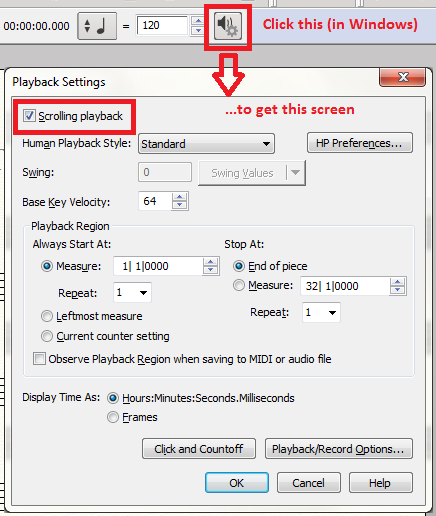
I no longer have Finale 2012 installed, but in v25.3 (which IIRC has been pretty consistent over the past few version) you can click on the playback options button to access a screen that has a Scrolling Playback check box.


The same possibilities exist on a Mac, but the access button from the Playback panel are slightly different (a labeled button, not a speaker icon IIRC).

Comment actions Permalink
Avatar
0

That much I knew -- it's was checked to be providing scrolling playback, but it wasn't doing it. For three days. Yesterday afternoon - about 2 hours after I posted - it started working again. So if you know of anything beyond this checkbox that could temporarily dismantle that function accidentally - or a way to turn it back on besides this - that would be helpful. 

Thanks for sending this tho - I do appreciate your taking the time to respond!


Comment actions Permalink
Avatar
0

If scrolling playback suddenly stops, just quit and restart Finale. It's worth a try and might get you up and running quickly.

Comment actions Permalink

Please sign in to leave a comment.