New post
Avatar
0

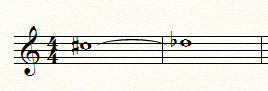
Hi.  Running Finale 2014.5 on a Mac.  I'm transcribing an organ piece by Dvorak and have come across several instances where enharmonic notes are tied together.  I can visually do this with a slur between the two notes, however the playback is messed up.  
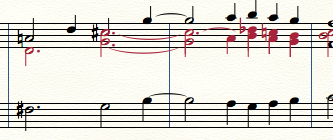

I can tie the "non-enharmonic" notes to fix the playback, but the visuals of the score are ruined.  
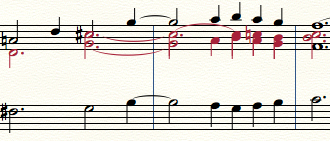

Is there a way to do this?

4 comments

Date Votes
Avatar
0

For the playback, use hidden notes in another layer (e. g. a hidden layer).


For the layout notes, de-select playback, e. g. via the very technical Speedy Entry Tool dialog box Edit Frame (exit the Speedy Entry rectangle, hold down alt, and click the measure/staff).

Comment actions Permalink
Avatar
0

One can tie two C#'s together and then via Speedy Entry change the second C# to Db by choosing the note and using the "9" shortcut. The tie will hold.

Comment actions Permalink
Avatar
0

J Adrian Verkouteren,


You wrote:

“One can tie two C#'s together and then via Speedy Entry change the second C# to Db by choosing the note and using the "9" shortcut. The tie will hold.”


If I understand the problem correctly, Thomas Kim is asking for a solution with both correct playback and layout.

Are you saying that your solution gives correct tie playback (= only one, long tone)?

I can not make that happen; I get two whole notes in playback.

Comment actions Permalink
Avatar
0

True, the notes repeat; that is something a future version Finale ought to correct.

The OP might also consider entering just the layer 2 notes in the measure(s) in question in a non-playing layer (I use layer 4, muted) and then adding a playing version of the second layer notes in a separate staff which can then be hidden. It is arcane, to say the least, but as you say, the Speedy Entry Frame is very technical.

Kind of a "pick your poison" situation. 

Comment actions Permalink

Please sign in to leave a comment.