New post
Avatar
0

I have read many suggestions and tried many things but nothing is working for me. I tried the following:

  • "Selection Tool" then select the notes I want to flip and press L. Nothing happens. 
  • Select specific layer and go to Utilities/Stem Direction/Stems Down. Everything in the measure changes direction.
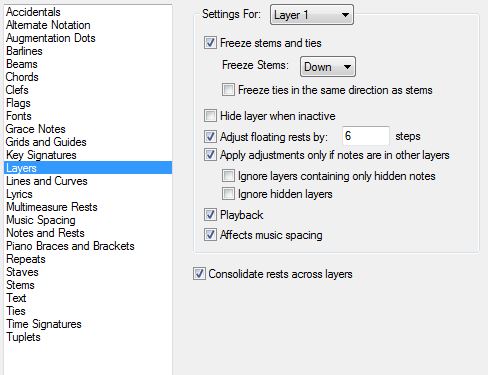
  • Document/Document Options/Layers - Layer 1 freeze stems down (see attached picture). Nothing happens.

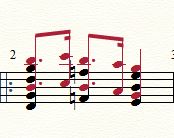
I would like the dotted eighth/sixteenth to be stems up (layer 2) and the quarter notes (layer 1) to be stems down. I would also like the notes off-set a bit. I have no idea what to even try there.
 I'm using Finale 2014.5 for Windows.

2 comments

Date Votes
Avatar
0

If you reverse the layers you have pictured, you will get what you want. Selection Tool > Right Click on Measure > Move Layers, layer 1 into 2, 2 into 1. You might have to reset the stem directions - click on measure > Utilities > Stem Direction > Use default. Use Special Tools > Note Position Tool to move the quarter note chords to the right.


I suggest you not change the layer options for any reason unless you know how it will affect your entire file, not just the measure in front of you.

Comment actions Permalink
Avatar
0

Mission accomplished! I used tools/advanced tools/special tools to flip stems and nudge notes.

I don't understand why the other methods didn't work, but at least it's done now.

Comment actions Permalink

Please sign in to leave a comment.