Someone is emailing files to me for me to edit but I'm getting a "read only" warning when I try to save the file. Is there a way around this? I'm not sure what version she is using.
Windows 7; Finale 23.3.0.276


The fault is probably at the sender but you need to know more info. I don't believe it is possible to save a Finale file as Read Only but it is possible for you to not have privileges to write to a file you've received. An email attachment can be sent as read-only.
If the version is too old, you cannot write to it and your PC is just giving the wrong reason. If the file has a .mus instead of a .musx, that's part of the problem. Have you downloaded the file to a directory you can write to before opening?
One or both of these should work: a) Open it, Save As and make a copy. If this doesn't work, there's a problem. b) Have the sender zip the file before sending.
If you received a .mus file, the sender cannot read your edits without having Finale 2012 or later. If 2012, you would export as 2012 compatible.
2011 and earlier cannot read a .mus file meant for 2012 (Notepad 2012 can but your .mus file cannot be edited in that).
If the sender has 2009–2014.5, you can send her a MusicXML file. She should install the Dolet 6 plugin to add maximum functionality to a .xml import (this augments the older versions of MusicXML that shipped with the those versions). Finale 2014/2014.5 can read your .musx files so Dolet isn't necessary.
http://www.musicxml.com/dolet-plugin/dolet-6-plugin-for-finale/
If your sender's version is older than 2009, she needs to upgrade unless content to read your .pdf files.
Thank you Mike Halloran. I did save it to a directory prior to opening and the file is a .musx. She saved as.xml and sent them and I'm able to work with them now. I was curious if it was a Windows 7 problem. My university doesn't want to upgrade to the later Windows OSs so that seemed like a logical jump. Anyway, we have a workaround.
thank you
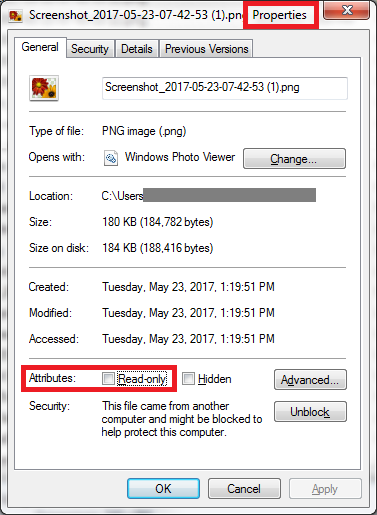
Thank you Adrian. I did save it to a new directory that isn't write protected. I hadn't thought to check the individual file properties but when I did the read only box wasn't checked. She sent the file in an .xml and it worked so we have at least a solution if not the solution.
thank you
Please sign in to leave a comment.
5 comments
Date Votes