New post
Avatar
0

Hello everybody,

working with Finale 25 I wanted to count items and I can't find it anymore in Plugins/Miscellaneous. There was also File Info under File menu before, it is also gone.

Who can help with this?

Thank you.

Juraj Bartos,

finale 25, 2014.5, Mac OS 10.10.5 

14 comments

Date Votes
Avatar
0

I found it - it is in lower right corner in Score Manager.

Comment actions Permalink
Avatar
0

Anyway, Count items in Plugins/Miscellaneous is still missing....

Comment actions Permalink
Avatar
0

… File Info under File menu before, it is also gone …


Yes, the File Info now has its own chiclet in the Score Manager.

And in the lower right corner of File Info you have the button “File Statistics…”.


You also have

Document menu > Data Check > File Maintenance…

which will provide some File Statistics.

Comment actions Permalink
Avatar
0

 “File Statistics…”. Does not include note count. 

Document menu > Data Check > File Maintenance…has no statistics at all that I can see.

Comment actions Permalink
Avatar
0

… “File Statistics…”. Does not include note count. 

Document menu > Data Check > File Maintenance…has no statistics at all that I can see …


Kevin Weed,


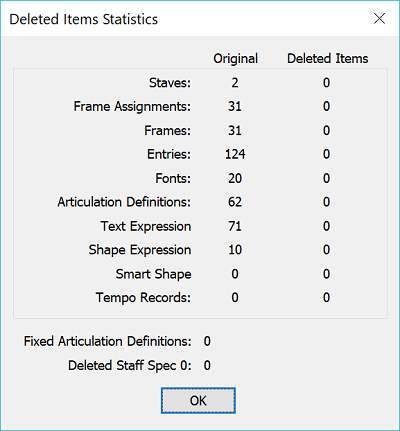
In {Document menu > Data Check > File Maintenance} you get a count of the Frames, and a count of the Entries.

Perhaps you do not see that as statistics, but I do.

Comment actions Permalink
Avatar
0

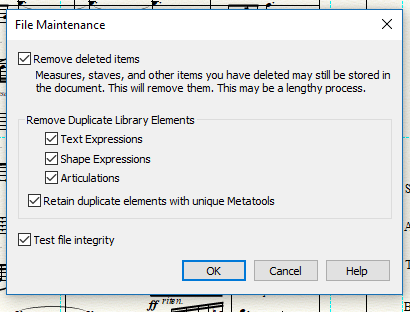
In Finale 25 this is all I get when I click on {Document menu > Data Check > File Maintenance}

:


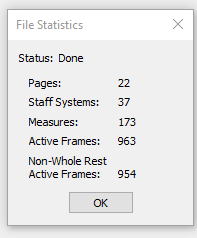
And File Statistics gives:

Comment actions Permalink
Avatar
0

… In Finale 25 this is all I get when I click on {Document menu > Data Check > File Maintenance} …


I get the same File Maintenance window.

But when I click OK, I get a list that includes a count of the Frames, and a count of the Entries.

Comment actions Permalink
Avatar
0

Even in an "empty" default doc, I get...


Comment actions Permalink
Avatar
0

… Even in an "empty" default doc, I get…


Are you asking a question about the statistics?

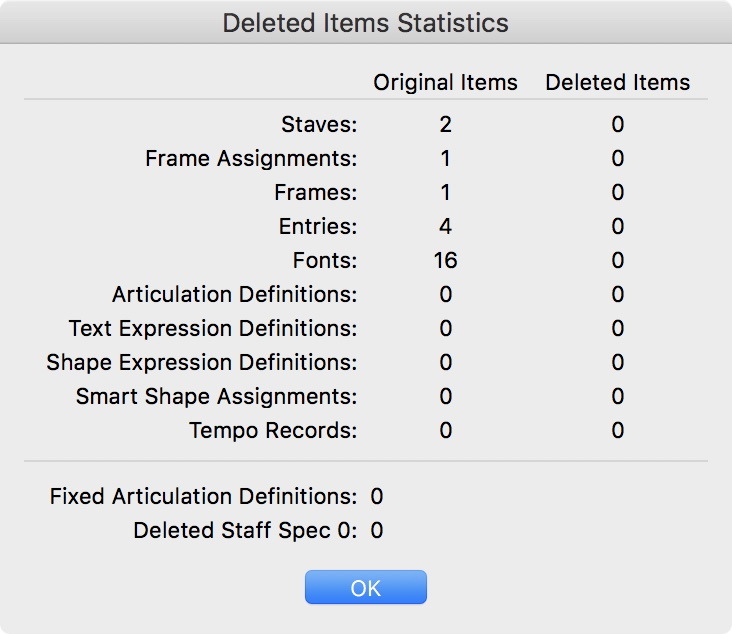
Please do also take a look at the statistics for a truly empty doc, namely the so called “Document Without Libraries”:


Comment actions Permalink
Avatar
0

I am not asking a question. I am demonstrating that the Windows version of Finale provides information in the same categories as the Mac version, which suggests that Kevin is not getting a standard report.

Comment actions Permalink
Avatar
0

But you have to do the Delete Items process to get that.

Sorry. I am not having Finale automatically remove anything, so I have to re-proofread its possible mistakes.

Comment actions Permalink
Avatar
0

… But you have to do the Delete Items process to get that.

Sorry. I am not having Finale automatically remove anything, so I have to re-proofread its possible mistakes …


I could be wrong here, but I think that this is a misunderstanding.


The wording is remove deleted items, not delete items.

In Other Words:

Items that have already been deleted, may still be stored in the document.

This “clean up” process will remove them.

Thus the document will get rid of “junk data”, and the result is a “cleaner” document, with a smaller file size.


Removing already deleted items will not affect the layout.

No need to re-proofread the layout, since the layout is not affected.

Also, the playback is not affected.

Comment actions Permalink
Avatar
0

Then run the utility on a copy of your file.

Comment actions Permalink
Avatar
0

Thanks. Yes I understand. I ran it on a copy and it said I should proofread it to be careful. 

They are right, My files are not too large.  

The original point was, there used to be a nice way to count items and it's gone. 


Comment actions Permalink

Please sign in to leave a comment.