New post
Avatar
0

Windows 7 x64
Finale v25
VSL libraries.


Score Manager.  What a pain to work with!  Can you make it easier to edit?   Why does the screen flash?  

  1. Selected Alto Flute to use GPO5.  
  2. Selected English Horn to use VEP.
  3. Lookiing back at Alto Flute and it changed to VEP.


Another problem is you numbering system.  When I want to change a midi port number, Finale decided it will  also change all those around it.  I just can't enter a number.  You have to enter a number press <enter> button, Finale then changes all number associated with that number.  Screen flashes, and I have to go back and double check the settings.  If Finale would let things be, I won't have to worry about what Finale messed up. 

7 comments

Date Votes
Avatar
0

Could you post a screen-shot of your Score Manager setup to show the problem?

Comment actions Permalink
Avatar
0

I was unable to duplicate the problem.  Rest assured.  It is there.

What I did do is post a YT vid to show how horrible the Score Manager is in Finale v25.

https://youtu.be/7stQM0tkYKg

Every edit one does to the Score Editor.  One has to scan to the left then to the right to see what Finale has changed without permission.

Comment actions Permalink
Avatar
0

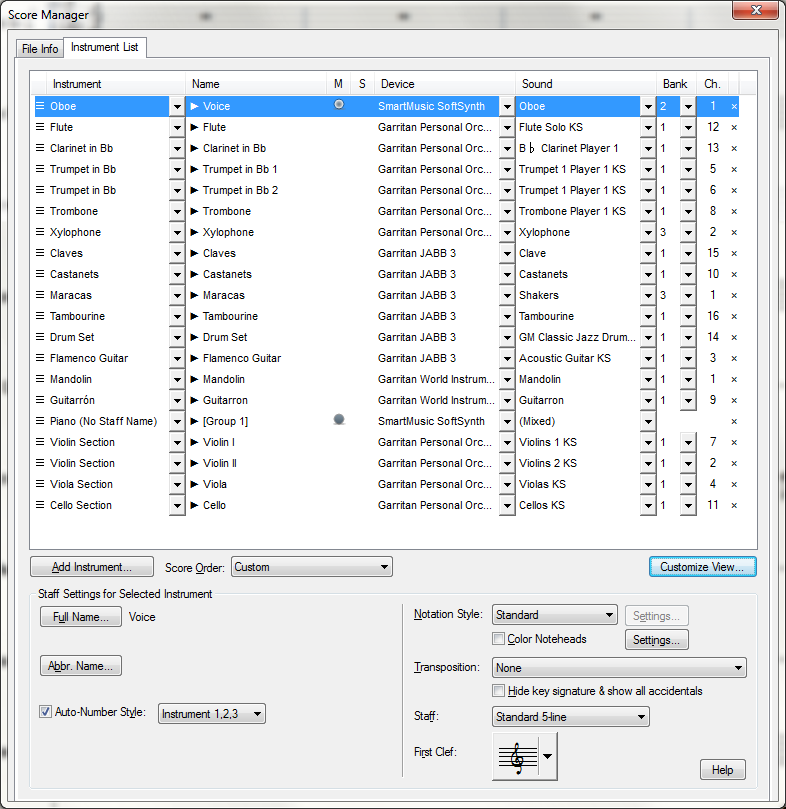
I am puzzled by your video. Your Score Manager does not look like mine. Are you playing back through VST?

  1. In Windows 7, the finale 25 Score Manager can be resized by dragging a border to show all the instruments (if your monitor is large enough).
  2. When I change something in the MIDI channel column and press return, Finale makes the change and stays in the same row and column.
  3. You have a differently names column to the left of the channel column that does not appear in my Score Manager.

In short, I do not experience your problem and cannot explain it. My Score Manager works fine. The one catch I have experienced is that I lost the ability to connect  Addictive Drums to my scores, but that seemed related to using the new 64-bit JW plug-ins.


Hope you find a solution.

Comment actions Permalink
Avatar
0

Is it possible that the problem is using Finale 25 with a very old Windows 7? I've encountered some issues with other software that I installed when I was using Win 7 that just doesn't work properly with Win 10.

Comment actions Permalink
Avatar
0

My (original) copy of Win 7 is from 2010. Of course I have upgraded regularly. 

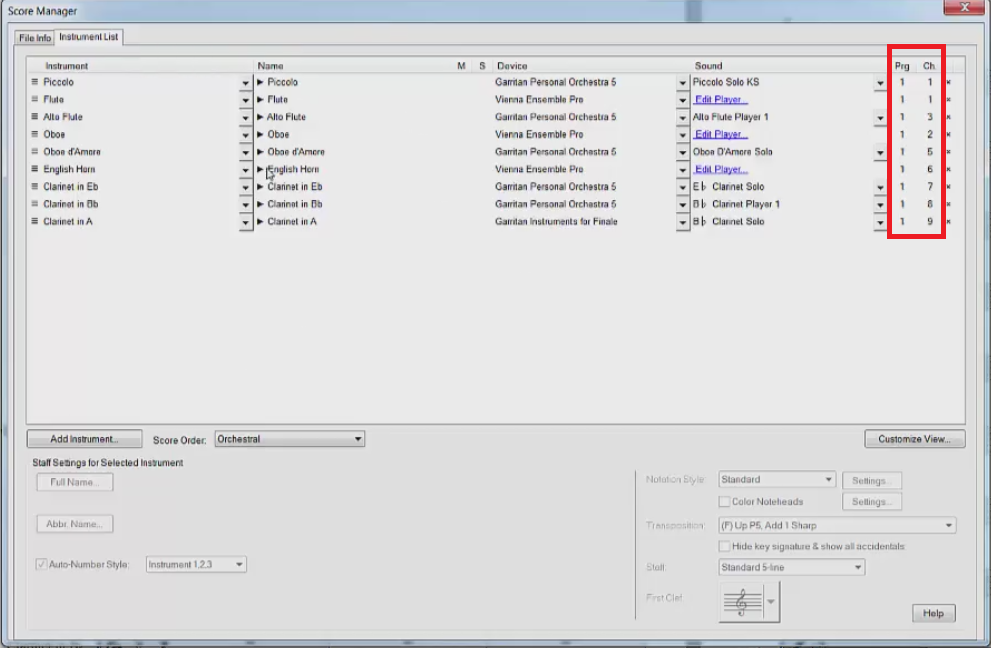
Given that your Score manager has Program and Channel columns on the far right (instead of Bank and Channel) suggests something else is going on either instead of or in addition to any Win 7 complications. Are you playing via MIDI rather than through VST? It does not look like it in the rest of your Score Manager columns.


You may want to use the "Submit a request" link at the top of the page to contact MM. IIRC you can send them a short sample of your musx file at that location to help them diagnose the problem.

Comment actions Permalink
Avatar
0

Not sure what old version of WIndows 7 is.  I have the latest updates.

I play through VSTs.    Here is another video.  https://youtu.be/_qjCbMfCuuk


Comment actions Permalink
Avatar
1

I am perplexed by the difficulties you are facing and also by the different appearance of your Score Manager.


Is it possible your last installation of Finale was incomplete or defective and that that would account for the occasional non-standard scrolling and irregular Bank/Program heading (not to mention bank assignment of your Vienna Ensemble player? A couple of possible courses of action:

  1. Rename your Finale.ini file and move it from its normal location in your %AppData%/MakeMusic/Finale folder. Then restart Finale and let it create a new Finale.ini file. If that works, you will have to re-enter your preferences; if not, you can replace the newly created ini file replace it with your older, renamed ini file by restoring its original name and location.
  2. Reinstall Finale 25.3. Be sure to move any personalized templates, files, and folders out of the Finale folder(s) so they are not overwritten. You can get help with this process if you...
  3. Use the "Submit a request" link at the top of the page to contact MM support directly. The behavior you are experiencing is not normal Score Manager behavior for Finale 25 as I have experienced it, and the MM Support folks can help.

I hope one of these options will help

Comment actions Permalink

Please sign in to leave a comment.