New post
Avatar
0

Hi 

I've got Windows 10 and recently switched from Encore to Sibelius 8.  I can't figure out how to get Sibelius to use the GPO5 (it can't seem to find the Aria VST).  If anyone can guide me I'd really appreciate it, however, not tooo hi-tech for my poor old brain (I'm pretty good with computers, but technology is running faster than me!).

Thanks John


7 comments

Date Votes
Avatar
1

Make sure you've got a 64bit ARIA Plugin installed somewhere on your system.


By default I believe the Garritan installers put them in:
"%SYSTEMDRIVE%\Program Files\VSTplugins\Garritan"


And it usually stashes a copy of all the plugins here as well (which can be copied and pasted anywhere you like for convenience sake):

"%SYSTEMDRIVE%\Program Files\Garritan\ARIA Player\VST"


If you don't see them in any of the locations above, then try doing a Windows Filer Explorer search for:

ARIA Player VST_x64.dll

As you can see in my case, I've got copies (or file-system links/junctions to copies) in various places on my System since I use a variety of hosts and keep a variety of directory configurations handy.  Just take note of a location where it's found on your system.........if Sibelius isn't already looking there, we can teach him where to find it.


If you still can't find the plugin, then you'll need to reinstall ARIA, and make sure you let it put the plugins in a location of your choice.  Standard locations tend to be:

"C:\Program Files\VSTplugins"

"C:\Program Files\Common Files\VST2\"


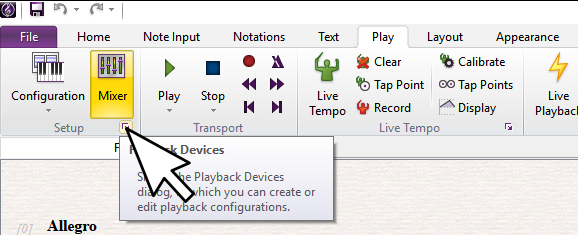
Upon loading a score or template into Sibelius, click the Play Tab, and then the tiny "Setup" icon.


This should bring up your Playback Devices Dialog.

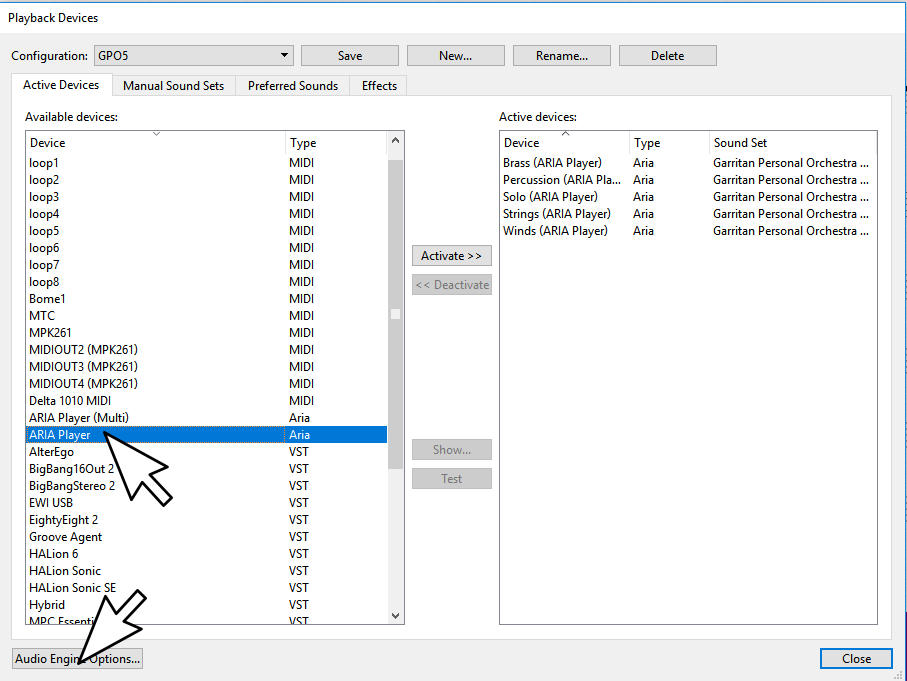
If you don't already see ARIA listed in your list of available plugins, we'll need to tell Sibelius to scan for the plugin you located earlier.  So click the "Audio Options" icon in the lower left corner.


From here, we can tell Sibelius about any other Directories we want to scan looking for plugins.  Or, we can copy and paste our ARIA plugin to one of the directories that Sibelius is already watching.


Once you've got Sibelius properly directed to your plugin, fully exit Sibelius and relaunch it.  Look again to see if it is now in your list of available plugins. 


Note, that ARIA comes with a standard stereo, and a 'muti output' version.  For Sibelius, there's no advantage to using the Multi Output variant.  The regular one is fine.


If you're positive you've got ARIA installed, and Sibelius is pointing to its location, or if Sibelius crashes when trying to scan your system next time you launch it (very rare, but possible), try quitting Sibelius and removing the PlogueEngine directory so it will be forced to rescan everything from scratch.

To remove this directory hold your windows key down and tap r, to bring up the Windows "run" dialog in the lower left hand corner, just above your 'Windows Start' icon.

Copy and paste this in to the dialog.


"%USERPROFILE%\AppData\Roaming\Avid\Sibelius"


This should bring up an Explorer Window where you can right click and Delete the "PlogueEngine" directory.


Once you can verify that Sibelius is finding your ARIA plugin(s), you'll want a GPO5 'soundset'.


Officially there is no such thing, but I've put together a personal soundset you may download from here:

https://makemusic.zendesk.com/hc/en-us/community/posts/115000169548-GPO5-Sibelius-Soundset-Version-22- 


Sorry about all the typos in my hurried documentation, but the soundset above does include some instructions on how to install and use it.  As a novice, simply let it do its thing.  If you have more advanced questions about the soundset, direct them to the thread above, or start a new one.


Good luck :)


Comment actions Permalink
Avatar
0

Great, Thanks so much for that help.  

My understanding now is – that Sibelius doesn’t know GPOP5, which explains why I haven'’been able to find/load any instruments (I wish I'd known that earlier on).  You have now given me a Sound Set containing most of the GPO5 instruments.

 I have downloaded the file (that you gave me the link to).

 Now, I open a score and go to Play, Configuration (it seems I didn’t really know what ‘Configuration’ meant).  I have Aria Player as an Available Device and an Active Device at the same time, which means I can have several instances of it as an Active device if I want (you can’t do that with Sibelius Player.

 If I’ve got this correct I now write in a name for the Configuration (that may be the name of the score; or a genre such as Piano Trio or Violin Sonata or Song (with piano accompaniment) and set up a configuration for each.  Once I’ve named the Configuration, I go to Manual Sound Sets and select the instruments I want for that score (or that genre), and then save it.

 When I start a new score, e.g a Violin Sonata I go to Configuration and select the one for Violin Sonata and the piano and violin are pre-set here now.

When I open an existing score I do the same thing.  Have I got it?

Regards

John

Comment actions Permalink
Avatar
0

Hi Brian, 

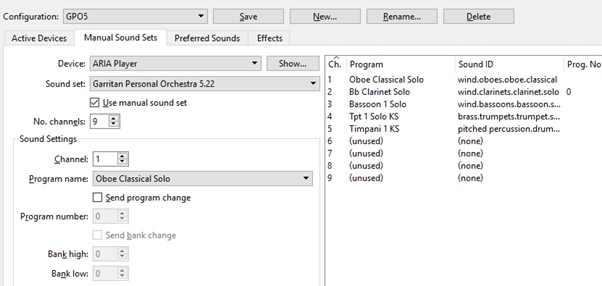
I meant to include this screen shot....

Comment actions Permalink
Avatar
1

John,


You don't need the manual sound sets if you're using my 5.22 soundset.  If you have a soundset.xml active, then you do NOT need anything set in the "Manual Sound Sets" tab.


Using my soundset, Sibelius will automatically choose instruments (closest match it can find) when you load a new score.  If you don't like the default choices I've set, you can change them via the Mixer, or in a stave's "Instrument Setup". 


I.E.  If you'd rather use the Legacy GPO4 ensemble strings instead of the new Garritan Orchestral Strings that get called by default using my soundset, you could change to those after you've loaded a score (Either via the Mixer, or via Instrument Setup for the stave(s) directly).


Example SetUp Process:

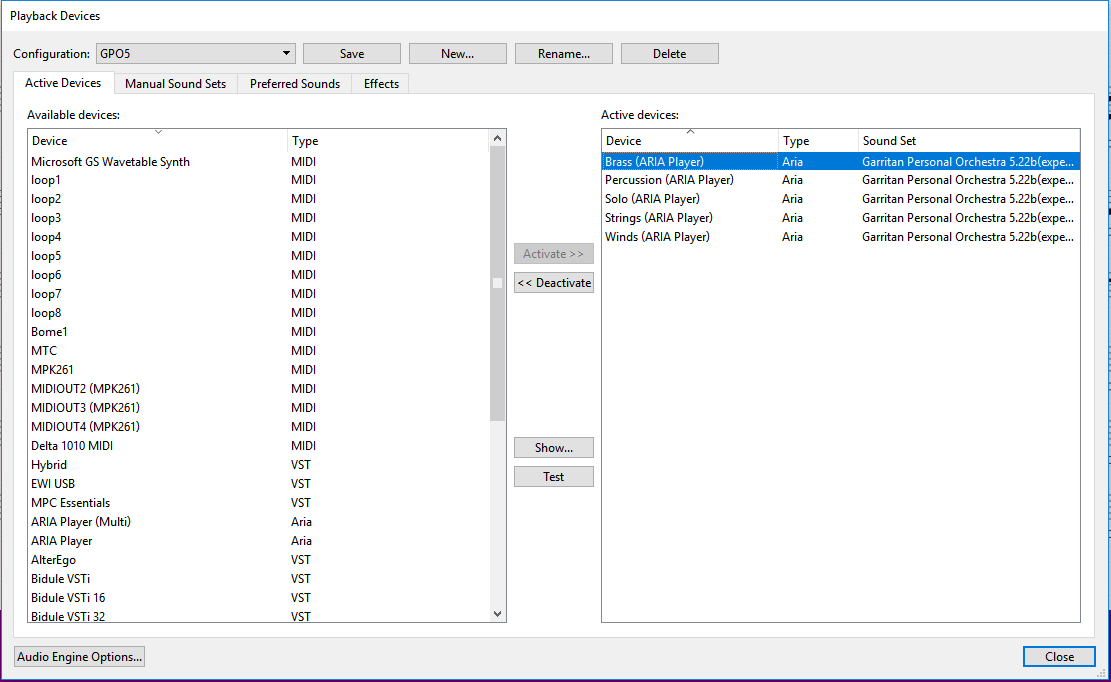
1.  Just load up 2 or 3 instances of ARIA.  (Each instance can handle 16 instruments....so 3 should plenty for most scores, and you can add more if needed).


2.  Change the soundset to Garritan Personal Orchestra 5.22


3.  Save your configuration.


All done.  Now when you load scores, it'll automatically load up instruments in ARIA.  In this case, Sibelius will choose ARIA Instances and instrument slots on his own.  Early on in a Sibelius session, they'll usually be in Score Order; however, they could be in almost any order depending on how many scores you've opened in succession using this same configuration in a Sibelius Session.


Totally OPTIONAL:

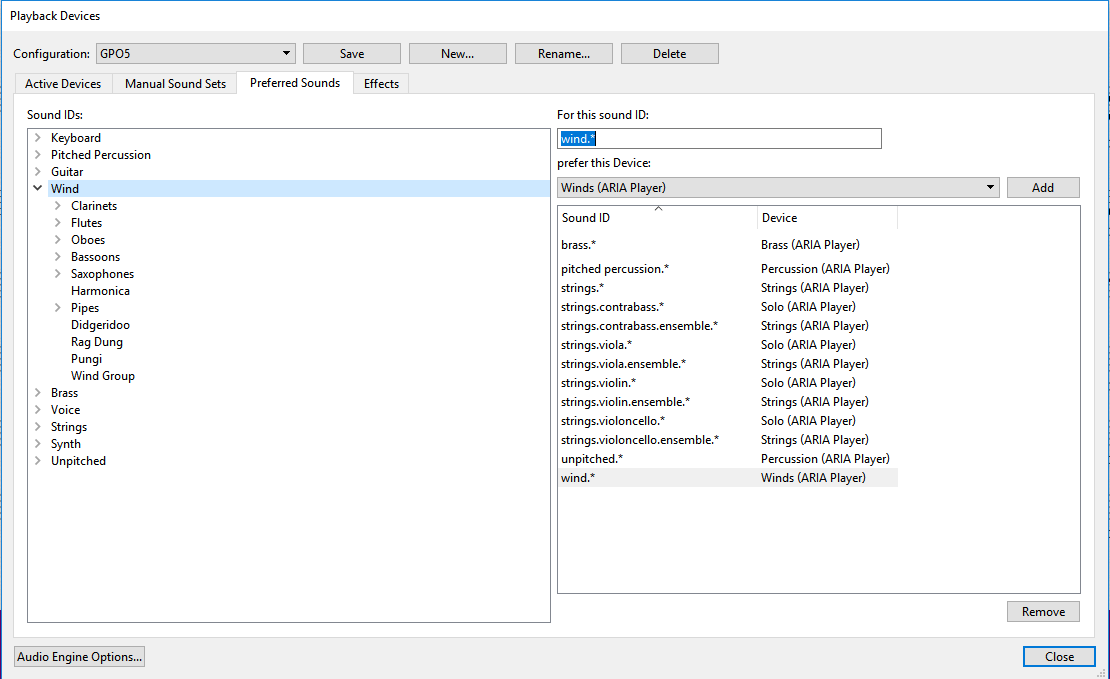
IF you want to designate specific instruments to a specific ARIA instance (perhaps you've renamed it), you can do that through the 'preferred sounds' tab.  Still, you do NOT need to click the 'manual sound set' box and fill out those soundworld IDs.


Here's an example where I wanted to direct winds, brass, strings, etc. to use specific ARIA instances.  In this case, I wanted to do this so I could more easily have independent reverb settings for each 'instrument family' in each ARIA instance.


This can also come in handy if you want to use different Plugins or Libraries (Not just ARIA).  I.E.  If I wanted Strings from GPO5, percussion from Groove Agent, and some organs from Halion 6.


1.  I loaded up 4 ARIA Instances.  I double clicked them one by one and renamed them according to Instrument Families.


2.  I clicked the "Preferred Sounds" tab, and told Sibelius to direct staves with these soundworld ID's to use specific ARIA instances.

Comment actions Permalink
Avatar
1
Comment actions Permalink
Avatar
0

Thanks again Brian.  Obviously I didn't quite have it.  I worked through your last post and it's all good now.  I guess what I was trying to do was putting an 'independant' sound set together, from various sources.  Anyway, GPO5.22 is there and it's working so I appreciate the help.


Regards

John

Comment actions Permalink
Avatar
0

Thanks Brian Roland!

Your sound set was my issues as well. It is working well now. Thanks for sharing it.

Kind regards, 

Brett

Image already added


Comment actions Permalink

Please sign in to leave a comment.