New post
Avatar
0

In V25 of Finale, in the Help file it shows that you cas Enable Inter-Application Ports. Supposedly Finale will generate some ports that other applications can use for midi. I'm hoping that by doing that I might be able to add them in Sonar and avoid the error that no midi ports available when Finale is Open or vice versa. It's a little frustrating for me when I want to work out harmonies using VST plugins in Sonar and then return to Finale. I always have to close one or the other to get the focus back to midi input on either application. 

In Finale V25, I go to Midi/Audio -> Device Setup --> Midi Setup opens but there is no Enable Inter-Application Ports box that is shown in the Finale Help File display. I don't know whether that option would solve my problem, but I would sure like to try it.

If you search for Enable Inter-Application Ports in the Finale help file you will see the picture, then when you open that menu from with in Finale, those options do not appear. Anyone have any ideas or maybe the option has been moved?

Thanks

5 comments

Date Votes
Avatar
0

Please provide a link to where the Help Files say anything about Inter-Application Ports.

I'm afraid it did not come up when I searched the help files.

Comment actions Permalink
Avatar
0

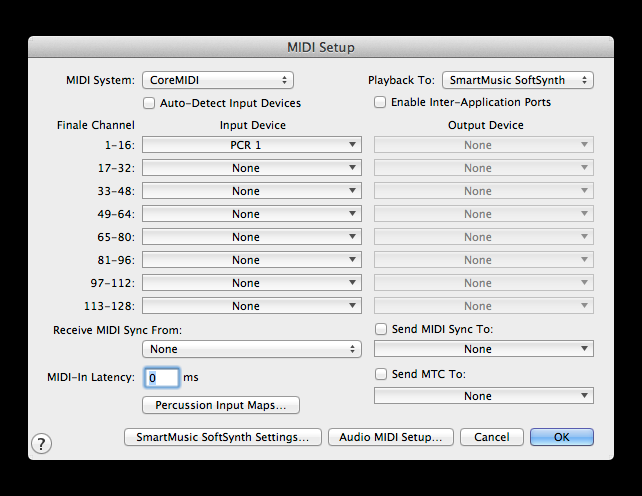
Here is the interesting thing. I purchased V25 at the great upgrade price.  I downloaded the Finale help file from their site so that I did not have to go online each time I wanted to look up anything. In the file I downloaded, the below screen shot shows the Midi Setup page.

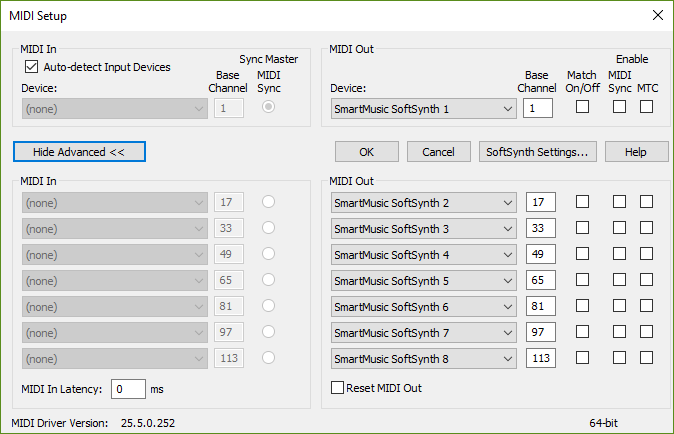
After this posting, I went to the help -> user manual from within Finale. Searched for Midi Setup, and the below options screen shows.

The above comes up at https://usermanuals.finalemusic.com/FinaleWin/Content/Finale/db-midi-setup.htm?Highlight=midi%20setup

Completely different then what I had downloaded off of the site when I first purchased V25.

I'm guessing they dropped that feature, I would have liked to try it to see if it would allow keeping open midi devices in 2 different applications.

Comment actions Permalink
Avatar
0

The first screen shot is from the Mac Finale user manual.


The second screen shot is from the Windows Finale user manual.


I suppose that this issue is a matter of differences between the Mac version and the Windows version.

Comment actions Permalink
Avatar
0

Thanks for quick response. You've cleared it up, but it's a feature I would have liked to have seen in Windows.

Comment actions Permalink
Avatar
0

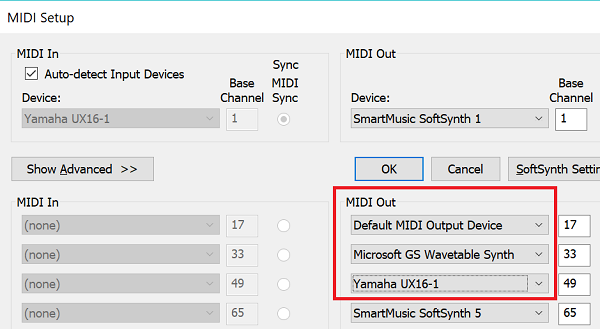
Thank you, Michael, for clarifying. What windows has done is simply fill the slots with multiple SoftSynths for each bank rather than requiring you to check the Enable box. As you can see from the diagram below, you can fill these slots with any MIDI device your copy of Finale recognizes.


Comment actions Permalink

Please sign in to leave a comment.