New post
Avatar
0

6 comments

Date Votes
Avatar
1

If this is what you want......then yes, it can be done in full Finale.
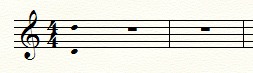
  1. Change the time signature of measure 1 to 1/4 displayed as 4/4.
  2. Enter the range as a quarter note with two (noteheads).
  3. Use the Measure Tool or Selection Tool to change the bar line to invisible.
  4. You will probably also want to use the Measure Tool to have Finale not count the initial measure in measure numbering.
  5. Use the % tool to reduce the size of the noteheads.
  6. Use the Advanced Tools stem-length option to shorten/hide the stem.
Comment actions Permalink
Avatar
0

Wow, thank you, Adrian - works like magic :)

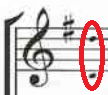
Is there a rule where this pitch range should appear? I mostly see it after the key signature and before the time signature - like this:

Or is it just arbitrary decision of each notator?

Thanks a bunch - I still say the Finale forum is the best!

Igor

Comment actions Permalink
Avatar
0

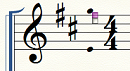
If you want the time signature after the range notation. 

  1. Change the time signature of measure 1 to 1/4, but do not flag it to display as 4/4.
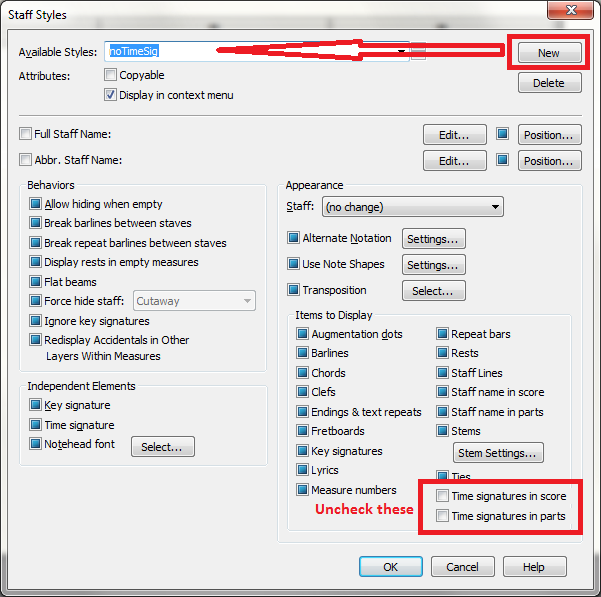
  2. Define a new Staff Style  to hide the time signature, and apply it to measure 1.


  3. The rest of the steps would be as before. (You may have to jump through hoops to get the first measure to be as narrow as you want.)
Comment actions Permalink
Avatar
0

Great idea - this with staff styles! Thank you again!

Plus there could be stems removed immediately for pitchRangeMeasure style. It's a pity we don't have a control for the size of notehead at note shape Settings. I suppose that would be too much ...

I can see you are a programmer too - from the naming noTimeSig :)

Best regards,

Igor


Comment actions Permalink
Avatar
1

Igor Beuermann,


You wrote:

“… It's a pity we don't have a control for the size of notehead at note shape Settings …”


If you are still talking about creating a custom staff style, then consider using - in the pane Independent Elements - a smaller notehead font.

Comment actions Permalink
Avatar
0

Hi, Peter,

Thank you! I've never used Independent Elements! This looks better and better! I'll try to do this in a script.

Of course the best it would be to run a script that would find the highest and lowest note in a staff and then insert the pitch range notes at the beginning :) But first things first. Then I'll need to figure out how to deal with XML documents.

As I said - the best forum on the world!


Best regards,

Igor


Comment actions Permalink

Please sign in to leave a comment.