New post
Avatar
0

I am not able to see the dynamic markings when choose the expressions tool. Any ideas on how to get these back?

4 comments

Date Votes
Avatar
0

Need more information.

  1. What version of Finale are you using, and what computer Operating System?
  2. Is this a pre-existing file or a new one?
  3. If pre-existing, where did it come from? Did you create it or import it from another format (MIDI, XML)?
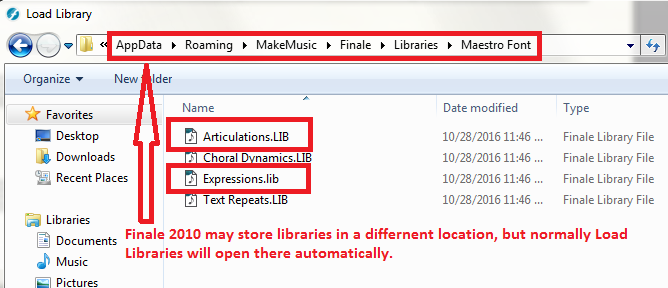
  4. If new, did you by any chance start with an empty file without libraries? If so, you will need to load the libraries you need--the appropriate expressions library, for example.

If you have additional information about your file, that would be helpful as well. By dynamics, I would assume you are looking for volume settings such as abbreviations for  forte or piano. If you are seeking hairpins for cresc. or dim., those are not expressions; they are SmartShapes.

Comment actions Permalink
Avatar
0

2010 Version. This is a new file and I created it in Finale. The same as I have always done. How would I reload the libraries. My expression and articulation tools are both empty.

Comment actions Permalink
Avatar
0

Load Libraries is an option in the File Menu. It appears you would want to import the appropriate articulations library and expressions library. (Appropriate means the one th at matches the style document you are using-- Engraved, handwritten, Maestro Font, Jazz Font,  etc.)


Comment actions Permalink
Avatar
0

They are back! Thank you so much!

Comment actions Permalink

Please sign in to leave a comment.