New post
Avatar
0

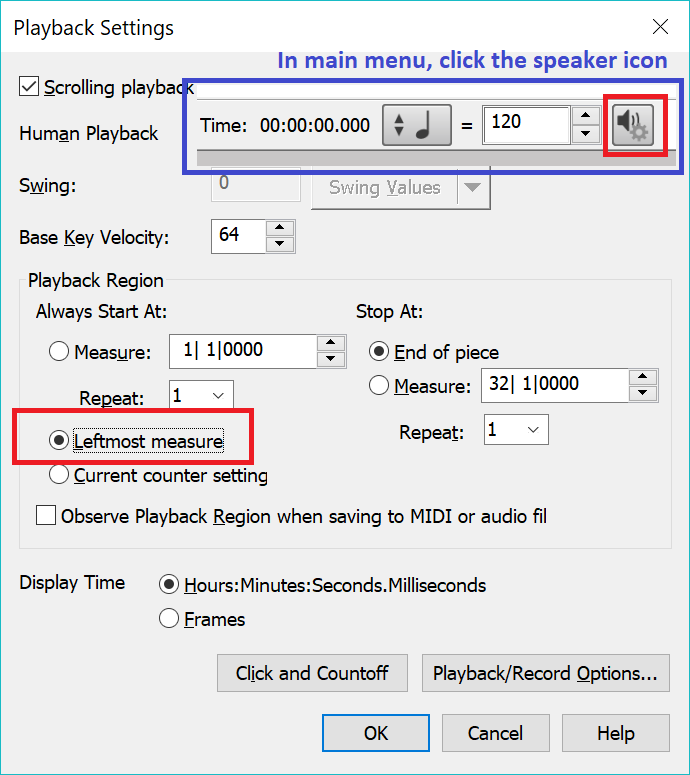
 The measure selection window is grayed out, I cannot select anything but measure one to start the playback.  The only way I can get Finale to play back a specific set of measures is to use the smart playback in the TG tools under Plug-ins, which is a real pain.  Anyone else with this issue?

using Ver. 25 latest update on a Win 10.  I've had this Issue since I've updated to Finale from PrintMusic.

5 comments

Date Votes
Avatar
0

Never experienced this myself. Of course I usually use Play From Leftmost Measure.

Comment actions Permalink
Avatar
0

Are you starting and stopping playback with the controls, or with the spacebar? If the latter, that's really a PAUSE, and so you can't change things.

Comment actions Permalink
Avatar
0

I am using the controls, not the spacebar.  and to answer J Adrian, I can't even find where play from leftmost measure is. 

Comment actions Permalink
Avatar
0

The playback window might not be expanded. I’m not sure where that control is in Windows, but a quick check of your help files should show you. Search playback window.

Comment actions Permalink
Avatar
0

If your main menu is showing Playback Controls (which I am guessing it is), click the speaker icon to get the Playback Window.


Comment actions Permalink

Please sign in to leave a comment.