New post
Avatar
1

Using iMac Retina 2015 and Sierra--10.12.5

Having trouble figuring out how to change the layout in order to put two short compositions or études, each with title and its own tempo and key signature, on a single page.  The exercise templates are too limiting. The staff tool and the Page layout tool would seem to be involved, but I do not see anything referring to starting a new piece in the middle of the page.

Would appreciate any help--could save a lot of paper!

Richard

9 comments

Date Votes
Avatar
0

Basically, you just got to play around with it to get it to look like what you want. I'm sure there's a dozen ways people have done this.


What I have done is set the system margins (excluding the top margin of the first system) to zero. I then play with the system spacing for each piece (which can be done on the System Margins edit box). You'll have to manually place the title and other texts where you want them to be. Be sure not to space systems evenly when doing this (if you are in the habit of doing that); everything should be done, more or less, manually. Depending on the instrumentation, this could be all done with the Page Layout tool.


If you tell me the the amount of measures, systems, and staves you are working with for each piece, I could help you better.

Comment actions Permalink
Avatar
0

Thanks, George.

I guess i was on the right track. I expected to be able to drag the systems into place, but I guess that doesn't work. M

There are just two studies of 3 or four staves or about 18 measures each per page. Each study takes about half a page.

Each study has its own title and a different key signature. These are purchased scale exercises to play with a recorded accompaniment. They are for violin and I am transcribing them for my viola. I can read the violin music ok, but remembering the viola clef is easier.

Grateful for your interest

Richard


Comment actions Permalink
Avatar
0

OK. I see. So basically it's a single staff for solo instrument. This is easy to do. Yeah, you just got to manually place things where you want them. There are dialogue boxes that help with positioning things more accurately you could use as well, like the Edit Frame Attributes dialogue box for text items I'm sure you are familiar with.


You can drag the systems manually to achieve this. Using the System Margins edit box and changing the distance between staves is just easier as you can select a range of systems and space them all at once.


 Things like this would be easier if you could attach and justify a text across a system, so that the text moves with the music .....


You may want to change the staff height as well if things are too big/small. If you run into any trouble, post a screen shot of the issue and someone (or myself) can try and resolve it.


Good luck.

Comment actions Permalink
Avatar
0

Things like this would be easier if you could attach and justify a text across a system, so that the text moves with the music.


I am not sure what you mean by your words “a text across a system”, but I suspect that it is already possible in Finale.

Could you be more specific?

What, exactly, is the issue?

Comment actions Permalink
Avatar
0

I mean a system of music. As far as I know, you can attach a text to a measure but you can't align the text to a certain position (top, bottom, center, right, left). You can do this with the expression tool, though. However, (as far as I know) you can't justify/align a text so that it centers across a system, like a title for example. If you could, then titles and other texts (composer, arranger, etc.) could move whenever you move a system of music, thus keeping the layout together.


This would be useful for having multiple pieces on a single page as the OP is trying to do (and I have done in the past). If this is possible, I don't know how to go about doing it.

Comment actions Permalink
Avatar
0

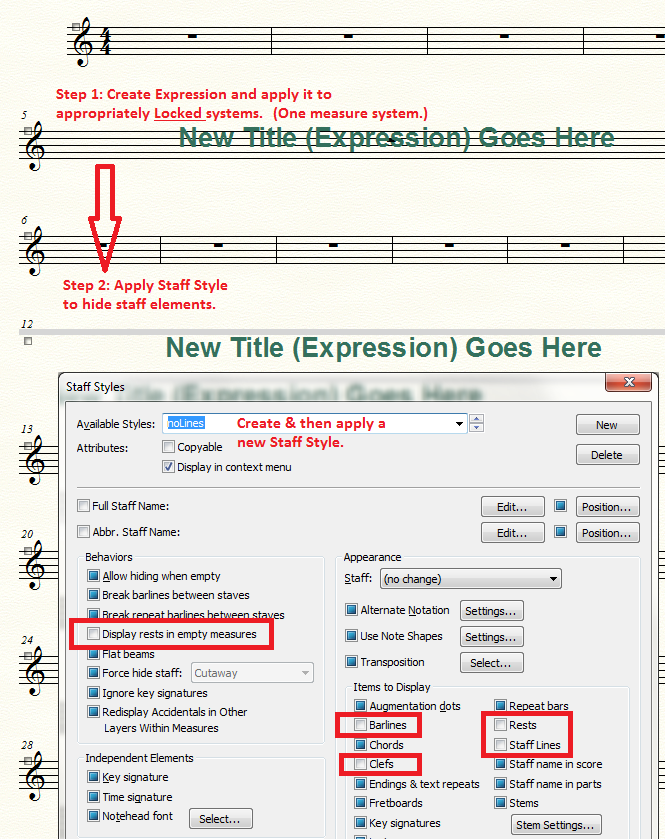
I suggest using an Expression attached to a one-staff system. That allows you to adjust positioning (centered). This also allows you to use an Expression category if you need to assign the expression to multiple instrument parts. Then devise a Staff Style to hide staff lines, rests, automatic rests, clefs, etc.


Comment actions Permalink
Avatar
0

Nice work-around. It may be a little involved if more is going on in the score, but nevertheless, great work-around. It would be nice if this were a thing you could actually do with text without having to use all of these tools (i.e., less "work," more time for other things).

Comment actions Permalink
Avatar
0

Thanks, Jadrian!

This looks like something that can be used over again. Very useful since I have many short practice pieces and folk songs to transcribe.

I will read up on the Expressions and Style dialogs and try this.

Comment actions Permalink
Avatar
0

Thanks Mohammed and Jadrian for your help.

Comment actions Permalink

Please sign in to leave a comment.