New post
Avatar
0

I'm using Finale version 25.3.0.276 running Windows 10.

I very often get an error message that pops up unexpectedly.  It happens most often if I leave Finale running and walk away from my computer and during the time away, my computer goes into Sleep Mode.  However it has begun happening randomly while I am working.

The message that appears is:

Error 2 copying file

"C:\Users\maxsh\AppData\Local\Temp\FINC8B9.tmp" to

"C:\Users\maxsh\AppData\Local\Temp\FIN48C5.tmp\presets\1.presets"

The system cannot find the file specified


I cannot save the file that I am working on... not even if I use Save As and rename the file.  As a result, I have to create a new blank score (I work with Concert Band or Jazz scores) with all of the appropriate key signatures/changes and meters.  Then copy and paste to the new blank score... then close the working file without saving... then reopen the working file from the last save... then copy and paste from the new file.  However, any format changes that i had made to individual parts are lost.  Frustrating

Help!!!!!!


7 comments

Date Votes
Avatar
0

See if you can export an XML file of the Finale work you have done, just as a safety.


I would never leave Finale open for an extended amount of time when I do not plan to be working on it. Too many things happen in the background OS.

Comment actions Permalink
Avatar
0

I have the same problem.  But, I don't even leave it on too long.  It happens when I first try to save on my laptop or even my desktop.


Dean


I'm using Finale version 25.3.0.276 running Windows 10.

I very often get an error message that pops up unexpectedly.  It happens most often if I leave Finale running and walk away from my computer and during the time away, my computer goes into Sleep Mode.  However it has begun happening randomly while I am working.

The message that appears is:

Error 2 copying file

"C:\Users\maxsh\AppData\Local\Temp\FINC8B9.tmp" to

"C:\Users\maxsh\AppData\Local\Temp\FIN48C5.tmp\presets\1.presets"

The system cannot find the file specified


I cannot save the file that I am working on... not even if I use Save As and rename the file.  As a result, I have to create a new blank score (I work with Concert Band or Jazz scores) with all of the appropriate key signatures/changes and meters.  Then copy and paste to the new blank score... then close the working file without saving... then reopen the working file from the last save... then copy and paste from the new file.  However, any format changes that i had made to individual parts are lost.  Frustrating

Help!!!!!!


I have the same problem, but even if I open the file and then

Comment actions Permalink
Avatar
0

Until you find an actual solution to this, realize that you may be able to retrieve unsaved work by exporting as XML.


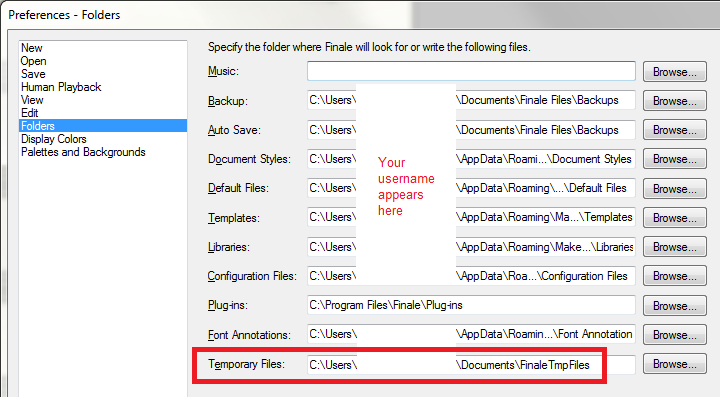
Some people found that creating a separate Temp File Folder for Finale files (I put mine at the top level of the Documents folder) and pointing Finale to save temp files there can help ameliorate the problem.


Comment actions Permalink
Avatar
0

Is Finale installed in the default location? 


Is is there a reason you aren't running the latest update?

Comment actions Permalink
Avatar
0

Mike,

Since I originally posted, I have upgraded to 25.4.1.152.


Still happens randomly.  I will certainly take all the suggestions into consideration


Thanks

Comment actions Permalink
Avatar
0

If I put the IMac to sleep while Finale is Open, the Computer Crashes upon waking it.

It also happens if I leave it on with Finale open, but don't use it for a while.

Kind of annoying!


Exactly how do you make a new Temp Folder?

I haven't had any trouble saving, but I've read about people changing the Temp Folder location a number of times.

"the top level of the Documents folder"-

I don't know what that means!


Comment actions Permalink
Avatar
0

Try disabling App Nap. Although Finale isn't supposed to be affected, many other applications are and that could be contributing to the problem.


App Nap serves no purpose except to conserve battery life on portables. No one knows why it is enabled by default on desktop Macs. When I disabled it, problems I had in Digital Performer, Office 2008 and 2011 disappeared.


To disable it globally, copy and paste the following in Terminal: 

defaults write NSGlobalDomain NSAppSleepDisabled -bool YES


Here is more info: http://osxdaily.com/2014/05/13/disable-app-nap-mac-os-x/


Personally, I've not seen this problem on systems where Finale is installed in the default location and I do not experience it myself. I haven't seen everything, however.

Comment actions Permalink

Please sign in to leave a comment.