I have trouble extracting parts. Some of the parts come out with only a few lines, some parts lack bars, and one and two bar repeat signs come out as breaks. Can anyone help me?
I have Finale v 27.3.0.137 and Windows 10.


I should of coarse have mentioned that I have written several arrangements for a 12-piece band. I set up and write all the lines in a score. When I have finished the score, I choose "extract parts". I have had som trouble with that command before, too, that for example one bar repeats come out in the part as rests. I have come around that problem by copying f.e. the guitar line from the score, and paste it into the extracted part for the guitar.
Recently, I have got problems that some of the parts come out with only two or three lines, the rest is simply not there. I have tried to use the same trouble shooting method as with the missing repeats, but it doesn' help. After some time, some of these parts appear with more lines, but they are not complete and not correct.
Yesterday I was editing an arrangement that i wrote in 2019, with Finale v. 25.3, and got the trouble I mentioned earlier. Can that have something to do with it?
… When I have finished the score, I choose "extract parts" …
I suspect that you do not know of linked parts (?)
Linked parts were added in Finale 2007.
The linked parts are in the same Finale document as the score:
Only one Finale document, containing both the score and all the parts.
You can print (the score and) the parts directly from the very same Finale document.
You can also create a PDF file of (the score and) each part.
The parts are “linked” to the score:
Correct a wrong note in the score, and the wrong note is automatically also corrected in the linked part.
My guess is that you are wasting time by extracting parts - work smarter, not harder.
To view/edit a linked part:
Document menu > Edit Part > …
Regarding your problem:
I suggest that you create Multimeasure Rests in all the parts:
Edit menu > Multimeasure Rests > …
Bjørn,
Let's try this to see just where the issue is coming from. As Peter has suggested the best way is to use Linked Parts.
Do this and see if the parts are as you want them. There should be no missing anything in them.
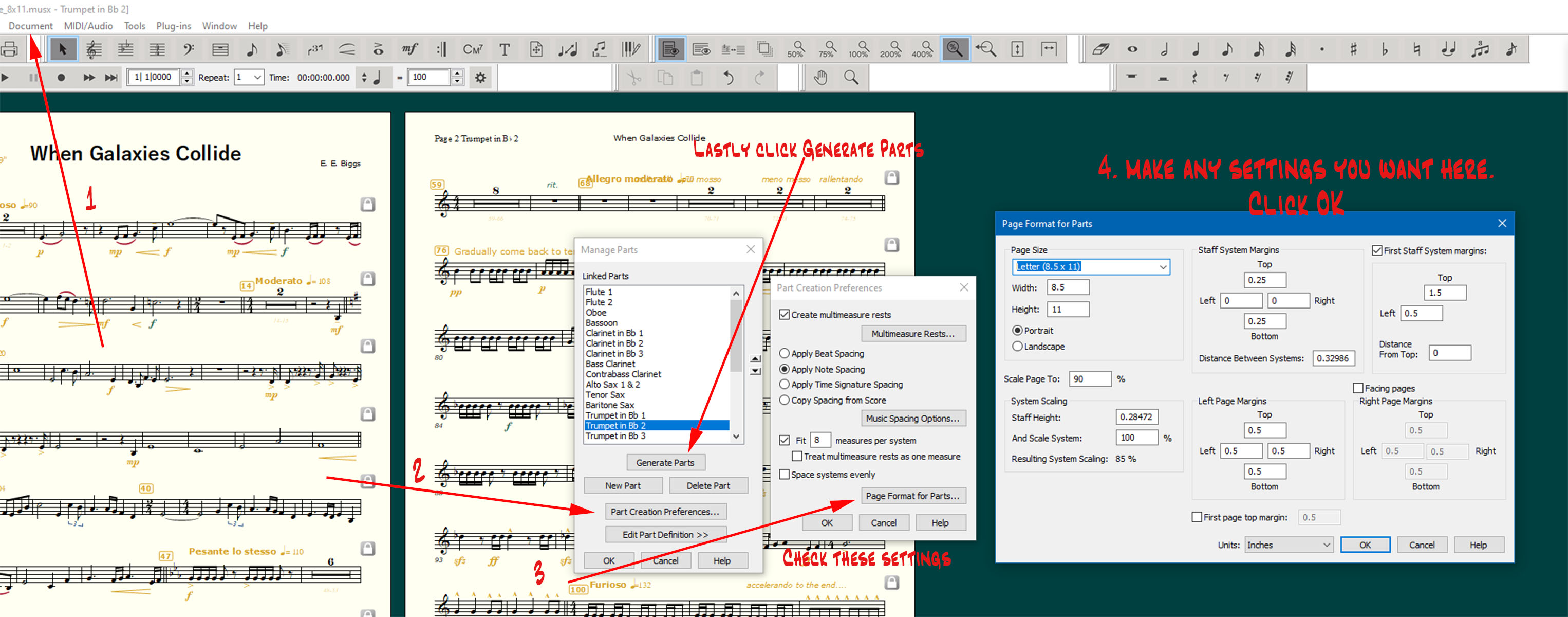
Now go back to the Document drop down>Edit Part>select any part (mine shows trumpet 2). You should see something similar to what mine is showing.
Peter and Ernest: Thanks a lot for very useful comments on how to use "linked parts" instead of "extract parts". I tried it right away, and it works exactly the way you say. All previous trouble is now gone! I have used Finale for nearly 20 years, and I must (shamefully....) admit that I missed the "linked parts" function when it was introduced. But it's never too late to learn!!
Please sign in to leave a comment.

7 comments
Date Votes