New post
Avatar
0

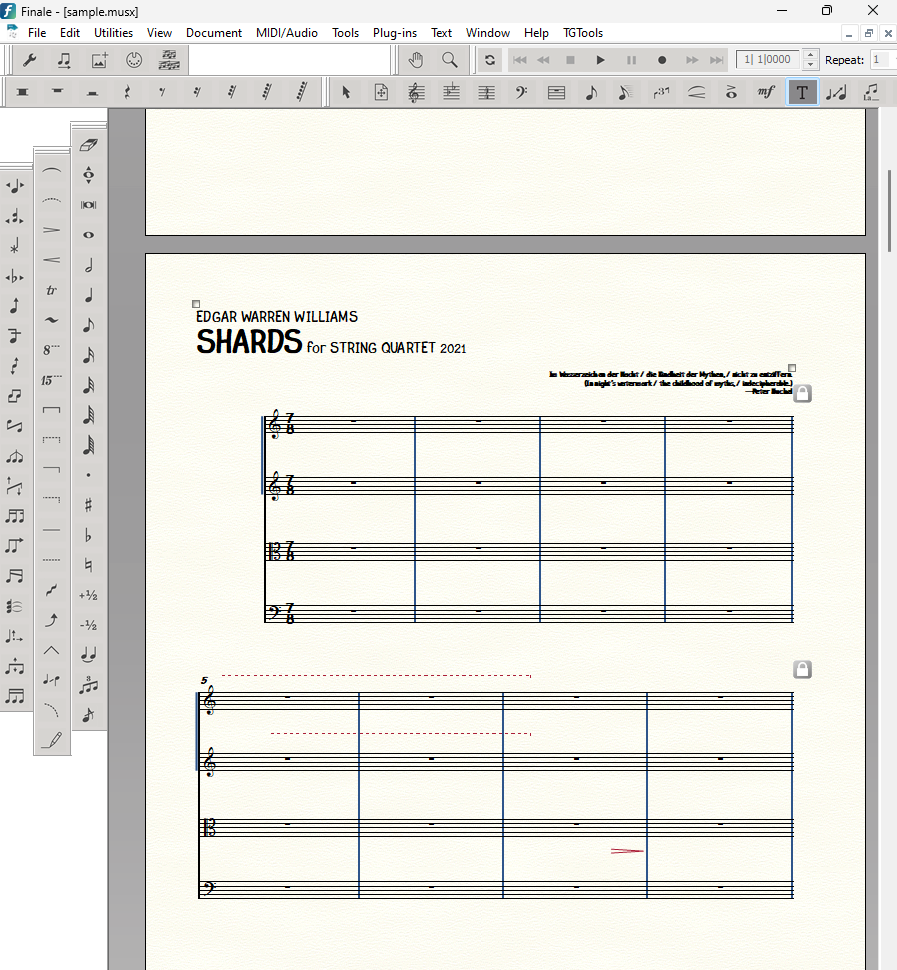
I often reuse finished scores.  I erase all the measures of a previous score and start a new one with all the libraries, etc. already in it.  The result is that when I create, say, 100 empty measures, I get leftover hairpins and systems alterations from the previous score.  How do I delete all such artifacts from a score?  (Finale 27 3.0.137; Windows 11 Pro 10.0.22621)

6 comments

Date Votes
Avatar
0

I do that as well. To avoid these problems, don't just erase the measures, but select all measures except the first one and delete all these measure stacks. Then insert your new amount of measure stacks and you should have a clean score to work with.

Comment actions Permalink
Avatar
0

Thanks for the quick response.  However, that's what I do, but I still get hairpins and smart-shape lines that remain in the score.  Here's an example.  This is a finished string quartet.  I selected all measures save the first and deleted the measure stack.  Well, I don't know how to add a file to this message, so you'll have to take my word for it.  Here's a pix of some artifacts, if that helps.

Comment actions Permalink
Avatar
0

I've never experienced this thappening. Since these are Smart Shapes, I imagine you have tried (after Selecting All) Clear All or Selected  Items (Smart Shapes)?

You can't attach files on this forum (why not, this being a Finale Support site, beats me ...), but you could upload it to somewhere like DropBox and post the link, for someone to look at.

Comment actions Permalink
Avatar
0

Thanks. That helped to remove the smart shapes.  (I hadn't thought to use the "clear all" option.)   Appreciate the help

Comment actions Permalink
Avatar
0

Just as an afterthought - should you need other support again some day, I would suggest to (also?) post at the "other" Finale Forum, where there are many, and very active and knowledgeable participants (and you can attach Finale files!)

Comment actions Permalink
Avatar
0

Edgar,

I do this routinely and I don't delete all the measures. I select all, Ctrl+A on Windows I suspect Mac has a similar key stroke.

The Clear all Selected Items. This has always worked and saves a lot of time not to mention it makes all your work look the same. For instance I have my Patriotic Series which I want them all to be similar. BTW, the other Finale forum mentioned above is an option but it is not sanctioned by MM nor monitored by MM like this one. Images are pretty limited too, not like what you posted here.

Comment actions Permalink

Please sign in to leave a comment.