New post
Avatar
0

Hi,

  I have made a scale sheet in the past and have now forgotten how. I want to set up each scale with arpeggio as a separate line. Also, how do you search the worksheets? I was hoping that you had 1 and 2 octave scales already done but there is no way to tell what a worksheet is until you open it up.

20 comments

Date Votes
Avatar
0

I, for one, am unsure what you are asking, since I don't understand what a "scale sheet" is that would use an arpeggio.

Comment actions Permalink
Avatar
0

A scale sheet is a list of scales. I do 1 oct and 2 oct between 3 and 3.  You can buy a book for it but mine were for all county and tri county auditions specifically. I want to make a new one for scales between 5 sharps and 5 flats.

Comment actions Permalink
Avatar
0

Still not sure. Can you post a picture?

Comment actions Permalink
Avatar
0

Under worksheets there's one called scales. Have you looked at that? If that's not what you need, just make your own. It's not that difficult.

Comment actions Permalink
Avatar
0

all the ones under the scale folder is like scale 1000, scale 1001 etc. 

I don't have a pic since I have it in pdf form for my students. I also have it in Finale but it doesn't look like I can upload it.  I took a picture but it's too much data to post.  Basically a 1 octave sheet (called sheet because it's not a book) starts with A major. The next line is D major. The following, G major etc. I don't have measures between the scales. It's just about a staff sized line for each scale between 3 sharps and 3 flats as well as chromatic, G melodic, and D melodic.  

Maybe I can send it to you through e-mail?

Comment actions Permalink
Avatar
0

Just take a screen shot. You can post that.

Comment actions Permalink
Avatar
0

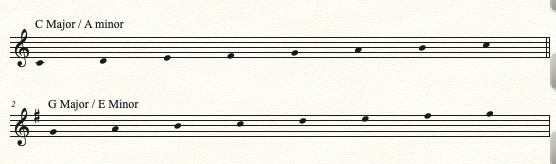
Is this (sort of) what you want?

Comment actions Permalink
Avatar
0

Sorry about the length of time for the reply, my schedule is a bit busy.Yes. It's the right style. Separate lines for each scale. I can do 1 and 2 octave scales.

Comment actions Permalink
Avatar
0

It took all of 60 seconds to set that up. Can you not do that?

Comment actions Permalink
Avatar
0

Mike, I'm glad you discovered what Chris needed; but I still can't figure where the arpeggios fit in. But it won't be the first time I've been mystified over something that turned out to be eminently logical.

Comment actions Permalink
Avatar
0

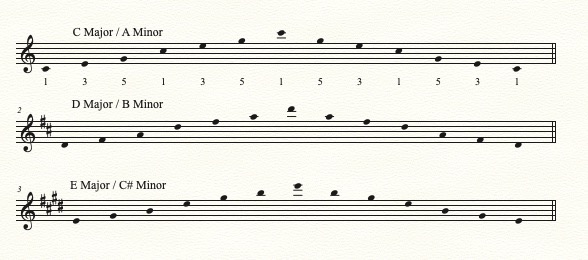
My guess about the arpeggios, when I was a young trumpet student, I had a book with scales. And after playing each scale there was an arpeggio in the same key as the scale, playing 1-3-5-8-5-3-1.

Comment actions Permalink
Avatar
0

I think he’s referring to an arpeggio as a broken chord, rather than a stacked one. So, a series of notes across the scale.


But Jeffrey has another perfectly good interpretation, too. I guess we’ll need the OP to tell us.

Comment actions Permalink
Avatar
0

That certainly makes more sense to me.

Presumably given space enough (and time) one could add (paste) that at the end of each system and transpose it into the desired key.

Comment actions Permalink
Avatar
0

I'm not a he.  Arpeggios are the broken chords. They are 1,3,5,1,3,5,1(and then backwards) for a 2 octave. In the scales. The numbers are defined by scale degree. Do and Do are the same note different pitch but they are both 1. So in D major the 1 octave arpeggio goes D, F#, A, D, A, F#, D. It can be done with the 7th but for auditions, it's hardly ever required. 

So where do I go to look it up or how is it done? It made sense when I did it the last time but that was about 15 years ago.

Comment actions Permalink
Avatar
0

Set the time signature to 13/8. Set measures to 1 measure per system. Enter your C scale notes in the first measure, and copy it to as many measures as you like. Change the key signatures for each measure, and the scales will transpose. Use Measure Attributes to hide the Time Signature and the Cautionary Key Signatures. Apply Staff Style > Stemless Notes. Scale degree added with Lyric tool.


Comment actions Permalink
Avatar
0

That is cool but not how I was told to do it originally. How many measures did you set after the first one? I don't think you can paste it to some random spot on the page.

Comment actions Permalink
Avatar
0

Chris, can you post a screen shot of what you want it to look like? Otherwise, we're just guessing.


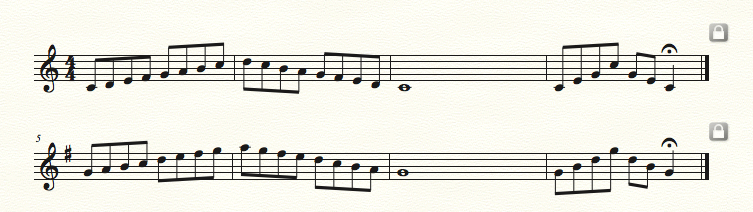
This is similar to the way I was taught.

Comment actions Permalink
Avatar
1

Chris, you can have as many or as few measures as you want. Each measure is the full width of the staff. But as Jeffrey says, seeing what you want is the only way to be sure.

Comment actions Permalink
Avatar
0

Screen shot is too big also.  What I'm looking for is what Mike posted 3 days ago. Let me see if I understand you correctly. Every 13/8 measure will look like that? I'm not going to have to leave a measure or 4 open so it starts on a different line?

Comment actions Permalink
Avatar
0

Nope. You don't need to leave any empty measures. You can move individual measures down with the down arrow, or use Utilities > Fit Measures to specify one measure per line.

Comment actions Permalink

Please sign in to leave a comment.