New post
Avatar
0

Hi all,

Windows 10 Finale 26.3.1.520

I just loaded Finale in my new computer. When I click on the Aria player I get an error message (see screen shot below). Then Aria opens up. I don't have a clue what to change in the preferences dialogue in Aria! 

It is currently at Audio Device API: ASIO

Audio Device: Realtek ASIO

Stereo Pair: 1-2

Sample rate: 4511 Hz

Butter Size: 496

Any help would be wonderful.

Thanks!

Kathy


6 comments

Date Votes
Avatar
0

I have better luck with the DIrectSound driver and a 44.1K bit rate. 48K might also work (depending on how your sound card is set up, but I have never heard of a 4511 rate.


I also prefer a 1024 buffer size.


Do your MIDI sounds work?


Did you install all the Garritan components: the Player installer  and the separate Sounds installer?

Comment actions Permalink
Avatar
0

Thanks for this quick response. I installed everything in the Finale setup. Also, installed Garritan Instruments with no problem and was able to activate them with the keycarsd. They show up in the Aria player and all but World Instruments show up in ScoreManager. And I have sound. 

I don't see a 1024 buffer size in the drop down menu.

Comment actions Permalink
Avatar
0

Comment actions Permalink
Avatar
0

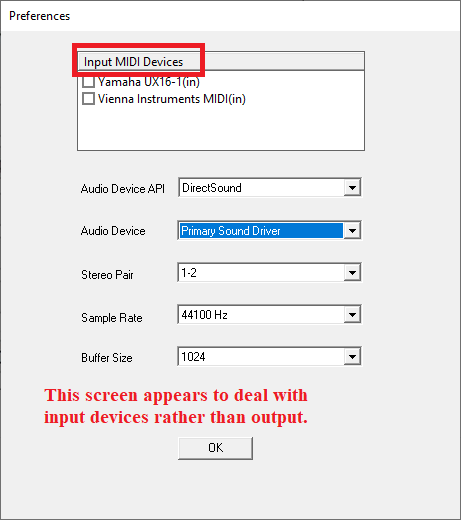
Thanks J Adrian. I have the Buffer Size in the Audio Setup in Finale set to 1024. When I click on the ARIA Player icon on my desktop, that's when I get the "Audio Engine Start Error". There is a Preferences file in the Tools menu of ARIA. And the dropdown menu for buffer size does not have 1024 as one of the choices! See attached graphic. 

Comment actions Permalink
Avatar
0

You left-hand diagram seems to deal with Aria input rather than output.


Comment actions Permalink
Avatar
0

That was it! No more error message after I plugged in my work station. Thanks so much. Mystery solved.

Comment actions Permalink

Please sign in to leave a comment.