New post
Avatar
0

Hello,

So I realize this is not necessarily a Finale question, but hopefully someone can show me the way here. 

I'm running a DAW (Digital Performer) and Finale 26 at the same time. I like that my QWERTY keyboard controls my Finale and my iPad has an app that is a control surface for my DAW in which I'm able to utilize transport, fader movements, soloing and muting tracks etc. It's wonderful, however there's something very annoying: every time I touch a function on the control surface on my iPad, it triggers a virtual instrument sound in Finale. And if I attempt to manipulate a fader on my iPad, it actually does a portamento effect on whatever virtual instrument in Finale that is selected, bringing it out of tune. Being that I'm not a midi parameter Wizard, I hope someone has a solution I can apply here.

Thanks!

MacBook Pro 2017 Mojave 10.14.6

Digital Performer v. 10

Finale 26 (most recent update)

6 comments

Date Votes
Avatar
0

You might want to ask this over at MOTUNation.com. There are a number of us who use DP and Finale over there. I have no answers based on your brief description but I am curious about your setup.

Comment actions Permalink
Avatar
0

Mark,


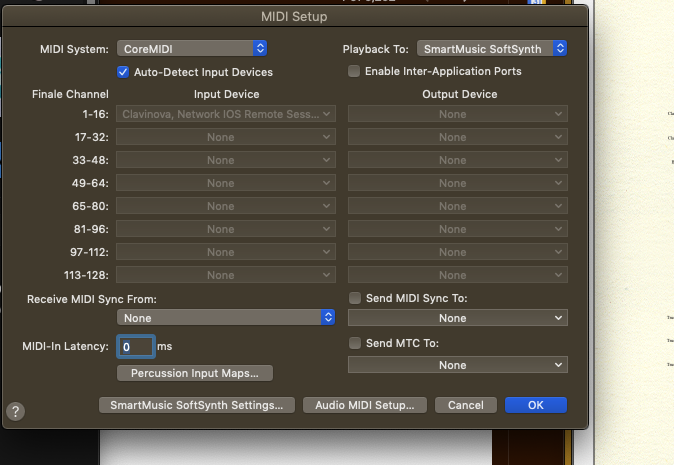
In some cases, iPad apps that work as DAW transport and fader controllers use the MCU protocol which is MIDI based. Typically they are identified by the computer as a specific MIDI input device. It could be that Finale is seeing the app as a MIDI device and has connected to it this way. Go to MIDI/Audio > Device Setup > MIDI/Internal Speaker Setup... and see if the app or your iPad is listed as a MIDI input device. If so, disconnect this by selecting None in the drop-down where it is currently selected.

Comment actions Permalink
Avatar
0

Hi David,

Thank you for this. Yes I can definitely see IOS Remote within Input Device channels 1-16. The problem is that I can't select it. It's greyed out. I've included a screen shot.

Comment actions Permalink
Avatar
0

Hi Mike,

I wrote my setup at the bottom of my question, well, the software involved. Other than that just a Focusrite Scarlett interface, some Yamaha monitors and bunch of plugins and libraries. You know, standard fare Lol

Comment actions Permalink
Avatar
0

Mark, if you deselect Auto-Detect Input Devices near the upper left-hand side, you can then edit the input devices manually. 

Comment actions Permalink
Avatar
0

David,

That fixed it! Thank you so much!

Mark

Comment actions Permalink

Please sign in to leave a comment.