How do I extract a string reduction part from a full score?
Mac Big Sur 11.3.1
Finale 26.3.1.643


Are you talking about combining the string parts into a single multi-stave linked part? If that is your goal, you can create such a layout in the Manage Parts area of the Document menu. In order to "extract" a part, you need to set up the linked part first.
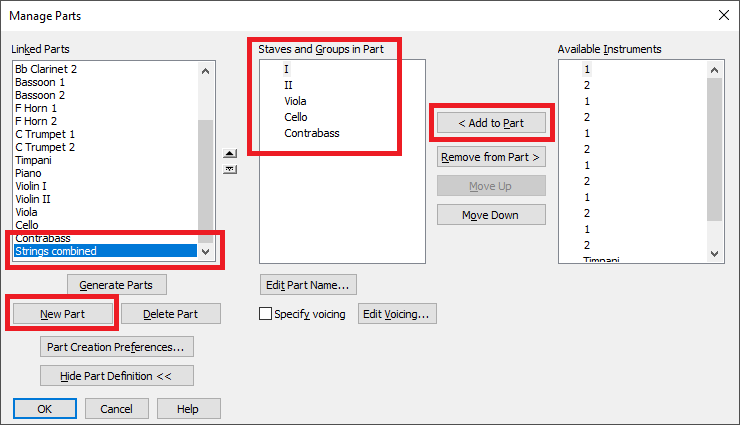
If you want to compress all the orchestral parts into the strings, that's a little more complicated.
You want to reduce the strings to a piano reduction? Try this on a copy of your file to see how it works.

… I need to take the string parts (violin, viola, cello) and create a keyboard string reduction part …
… How do I extract a string reduction part from a full score? …
If I understand you correctly, you have 3 parts in the score:
1. Violin,
2. Viola,
3. Cello
- right?
I suppose that all 3 parts are in Layer 1 - right?
And you need a keyboard part (Grand Staff) containing these 3 string parts - right?
In this case you are not, in “Finale-speak”, extracting, but rather creating a completely new part.
Idea:
Add a keyboard part (Grand Staff) to the score.
You can hide the keyboard part in the score, in case you do not need it to display in the score.
Copy the Violin part to the keyboard top staff.
Copy the Cello part to the keyboard bottom staff. Move the bottom staff notes to Layer 2.
Now you have the Violin part in the top staff, in Layer 1.
And you have the Cello part in te bottom staff, in Layer 2.
Copy the Viola part to the top staff or the bottom staff, depending on what works best in the context.
To avoid erasing what is in the staff already, in another layer, use the command
Document menu > Show Active Layer Only
Show Active Layer Only also means Edit Active Layer Only.
The Viola part can be in the top staff, in Layer 2, or in the bottom staff, in Layer 1.
Please sign in to leave a comment.
4 comments
Date Votes