

I'm using the latest version of Finale on a Windows 10 computer.
For a class I'm taking, I have composed a piece in the "piano roll" view of my DAW, then exported each midi part as a music xml file. It's not my favorite way to work, but the point is to get used to playing in parts in the DAW environment, then creating notation from that so that we can layer live instrumentation over our synthesized/sampled parts.
The DAW exports accurate notation, but doesn't necessarily correctly capture the key signature of the piece. Therefore I have to open each part in its own window (by way of File/Import XML) and edit it to make it match the correct key signature; then of course Finale automatically transposes the file as if I am changing the key of the entire piece, so there's another round of cleanup as I transpose then fix all the enharmonic misspellings.
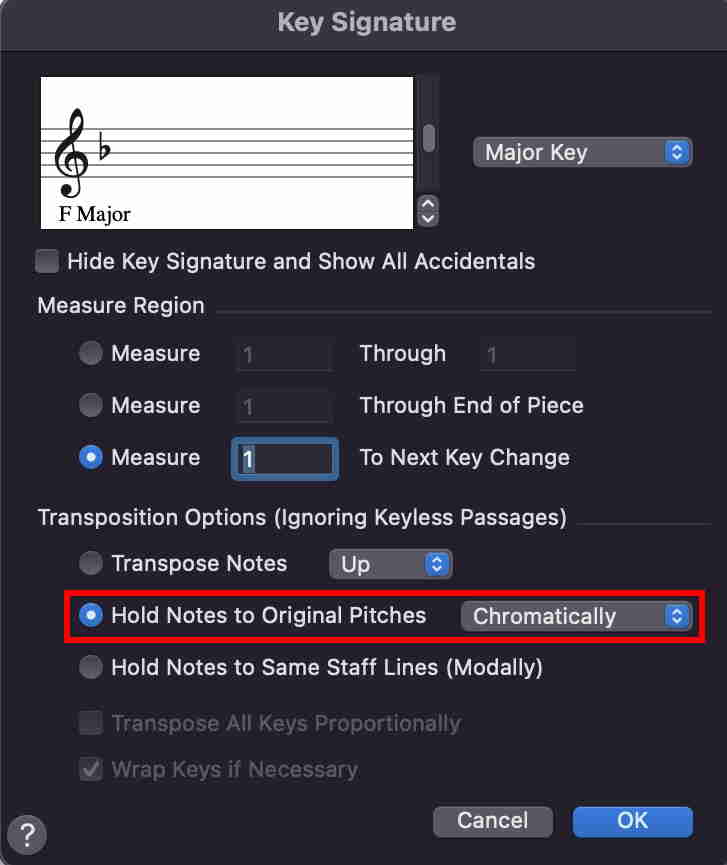
Is there a way to import a bunch of xml files simultaneously? Is there a quick way to manage the key signature problem, like is there a setting I've missed that would let me force the piece to open in the correct key? And is there a way to change key signature but not transpose (that one alone would save me the most amount of time, since that's where the real fight happens).
Thanks in advance!


3 comments
Date Votes