New post
Avatar
0

Running Finale 25 on OS X, (had the same situation with Finale 2014.5).  I'm scoring a big band arrangement and want the trumpet part for the A section to be "tacit" first time and only play on the second repeat. I submitted the question to Makemusic and got a nice response which is copied below, but unfortunately it doesn't seem to work.  I'm still trying to figure this out, but does anyone have a better way to do this?

Below is the recommended solution from MakeMusic... sure seems like it ought to work, but for some reason it doesn't.

"You can, in fact, have certain parts playback on particular repeat passes. There are several ways of doing this, here is one method:

  1. Select the Expression Tool and double-click on the first note of the repeat section in the staff you want silent the first time through.
  2. Select the Miscellaneous category.
  3. Click Create Misc. Expression.
  4. In the Description window type in "tacet first time", or something similar.
  5. Click on the Playback tab.
  6. For Type select Key Velocity.
  7. Set to Value: 0.
  8. Play Only on Pass: 1.
  9. Click OK, then Assign to place the expression on your score.

9 comments

Date Votes
Avatar
0

For a trumpet (especially if it is an Aria instrument) volume would  normally be set using MIDI controller code #7 or CC#11. Key velocity customarily only controls instruments that are "struck" (and cannot cresc. on a held note).

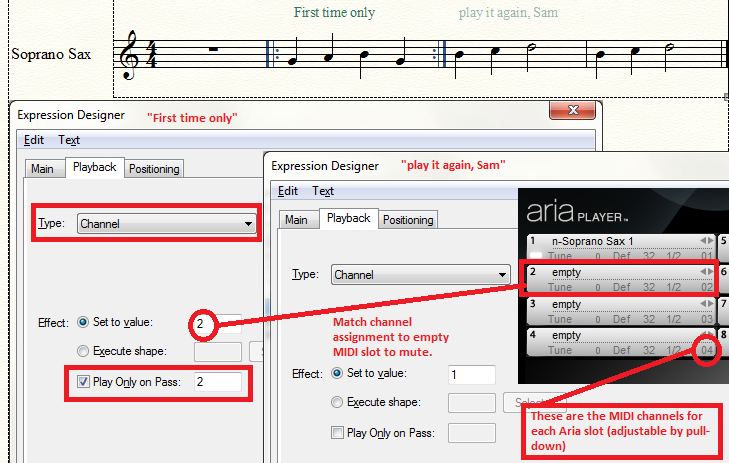
Another solution is to issue a command to change to an empty MIDI slot (in your Aria player) on the silent pass and then change back to the instrument MIDI slot through a hidden expression when sound is desired. This approach works for both struck and sustainable instruments.

Comment actions Permalink
Avatar
0

J Adrian V - Your first suggestion works great for the trumpets (and trombones).  I'm working on trying your second approach to mute saxes, because I haven't been able to get the first approach to work for them.  Midi is still a bit of a mystery to me though; clearly I still have a lot to learn with this program. 

Many thanks for solving my problem with the brass section, though.  Much appreciated.

Shep

Comment actions Permalink
Avatar
2

Here is how I managed to mute the Sax via method 2. I put the expressions into the Techniques category.

Comment actions Permalink
Avatar
0

J Adrian V - Outstanding.  That worked!  Since the arrangement is for a 16 piece jazz band with clarinet lead, all the channels in bank 1 were filled.  Took me a while to figure out that to select channel 2 in bank 2, all I had to do was select channel 18. That works to mute any instrument.   Then I created a "Play on Repeat Sax [n]" technique expression for each sax to reset it to its correct patch when I wanted them to come back in.  Works so well that for consistency, I did the same thing for the trumpets and bones.  Appreciate the help.

Comment actions Permalink
Avatar
0

I was having the same problem, and this worked. But the problem I have is that when you send the instruments back to their channels, first, they each need their own separate expression, or they would all be pianos, or all violins, what have you, which is clumsy. But also, when I return violin 1 to channel 1, it comes out as a piccolo, because violin is channel 1, bank 2, and piccolo is channel 1, bank 1. And there is no place in the expression edit box to input bank? Is that right?

Also, if I put the "mute" expression, set for 2d time only, at the beginning of the passage, it won't play the pickup in the first ending. But if I put it in the first ending measure, it won't play at all.

Comment actions Permalink
Avatar
0

Try MIDI channel 17 (16 + 1) to access the MIDI channel 1 in bank 2.

I'd have to see at least an image of what you want to say how to activate the pickup note if it is possible.

Comment actions Permalink
Avatar
0

Andrew,

Bank 1 has channels 1-16; to get to bank 2, just add 16 to the channel you want in bank 2.  Bank 2, channel 1 is 16+1=17, Bank 2, channel 2 is 16+2 = 18, etc.  

Concur that having to create a separate expression for each instrument is clumsy, which is why I submitted a feature request called "Tacit on Repeat" (can I get a few votes?) which would allow a single expression to switch each instrument to a null channel, then back to its original channel without us having to create individual expressions for each instrument in the ensemble.  

On your pickup issue, try creating a "Play" expression that sets the instrument to the proper channel, check "Play Only on Pass 1" and assign it to the first ending. Good luck.

Comment actions Permalink
Avatar
0

Thanks, Bill! Worked like a charm, and yes, I'm all for your "Tacit on Repeat."

Comment actions Permalink
Avatar
0

There appears to be a Finale playback bug that interferes with testing this. For me it appeared not to work, at first...

but that's because I was testing it using the little "Repeat" pulldown in the Playback Controls. Sure enough, it doesn't work if you write your expression, put it in the score, then play it back using this method.

It does work, however, when allowing the score to play through from the first time.

I'm gonna open a ticket on this.


Comment actions Permalink

Please sign in to leave a comment.