New post
Avatar
0

Hi,


I am new to Print music. As of now, I only purchased Print music to change keys, light transposing and and change a few chords with existing lead sheets. After purchasing, I was watching the tutorial videos and I could not find a few things which is essential.


1) I need to change some chords. After pressing t he chords tool, I can see that the tool has been activated. However, according to the manual, the chord suffix selection dialog box is suppose to pop up, I think. On my print music, it does not. Nor does the chord suffix selection in any of the drop down menus up at the top (file, edit view documents, etc) Can u tell me where this dialog box is located?


2) How do I change the playback music? For example: using an  existing sheet music, when I begin to play the sheet music, the sound is a choir sound.. How do I change it to a basic piano sound?


3) How do I erase an existing chord and enter a new chord in its place?


I have spent a fair amount of time already trying to find answers to these questions and am not able to. Its almost like Finale wants to cater only those who write music from a blank piece of staff paper and not existing sheet music. :)  If you could help me find these answers, I will most appreciative!


Thank you,

Shannon

4 comments

Date Votes
Avatar
0
Comment actions Permalink
Avatar
0

PS: To clarify, this is what I want to happen, but does not.


Nothing appears for me. I dont know if what is suppose to appear, after I click on the chord tool, is the chord suffix selection box or something else, but either way, i cannot access this box.


Comment actions Permalink
Avatar
0

Hi Shannon


I'm not up to speed with PM, but I'll give this a go.

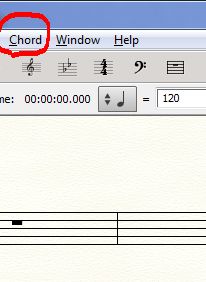
When you select the Chord Tool, do you not see the work "Chord" in the menu bar at the top of the screen?

The screenshot above is from Finale in Windows, but I'm sure you should see something similar if you're running PM (even on a Mac)

To get the Chord Suffix selection box, you need to:


    Choose the Chord tool .
    Check Chord > Type Into Score. (Im assuming that this is an option within the Chord menu. It is different in Finale 25)
    Click a note that doesn’t have a chord symbol attached
    Type :0, and press SPACEBAR.


The method outlined above does bring up the chord suffix selection dialogue box in Finale 25.


It does sound like you have had a frustrating time of it, but there is a very concise page which offeres most of the topics you're asking about.

https://usermanuals.finalemusic.com/PrintMusic2014Win/PrintMusic.htm#PrintMusic/Chord_symbols.htm#kanchor149 

For Windows, or


https://usermanuals.finalemusic.com/PrintMusic2014Mac/PrintMusic.htm#PrintMusic/Chord_symbols.htm#kanchor149 

For the Mac.


Finally, the last section of that page provides a clue to changing the sound for chord playback. (To prevent chord symbols from playing back)

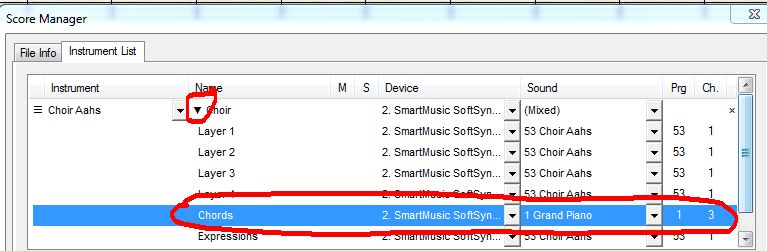
You can change the sound used in the instrument list.

Select the staff that has the chords you wish to modify and expand th staff to show layers etc.

Change the sound on the chord layer to whatever you wish (also change the channel)

I've used a different (complicated) method to change chord sounds in the past, but someone here pointed out a much more elegant (and obvious) solution in an earlier question about chords in Finale

I hope that this helps.


Cheers...


Daz :o)

Comment actions Permalink
Avatar
0

If I want to change a chord, I usually right-click on the chord's handle to ask for the Edit chord definition box.

Comment actions Permalink

Please sign in to leave a comment.